Loading
Get Generic Student Employee Timesheet - Orchid - Orchid Hosts Jhmi
How it works
-

Open form follow the instructions
-

Easily sign the form with your finger
-

Send filled & signed form or save
How to fill out the Generic Student Employee Timesheet - Orchid - Orchid Hosts Jhmi online
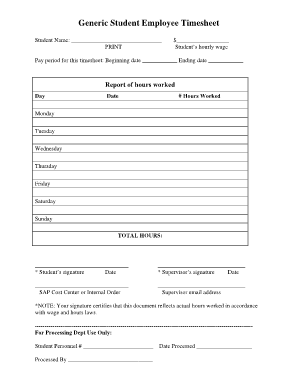
Filling out the Generic Student Employee Timesheet is an essential task for students to accurately report their hours worked. This guide provides clear, step-by-step instructions to help users complete the timesheet efficiently and correctly.
Follow the steps to successfully complete your timesheet.
- Press the ‘Get Form’ button to access the timesheet and open it in your document editor.
- Begin by entering your name in the 'Student Name' field. Ensure to print it clearly for better readability.
- In the section labeled 'Student’s hourly wage', enter your current hourly wage accurately, ensuring that the amount reflects your agreed pay rate.
- Next, fill out the 'Pay period for this timesheet', by entering the beginning and ending dates of the pay period you are reporting.
- In the 'Report of hours worked' section, list the days of the week. For each day, enter the date and the total number of hours you worked.
- Once you have input all hours worked for each day, calculate the 'TOTAL HOURS' by summing up the hours listed for the week.
- Both you and your supervisor must sign the document, affirming that the hours reported are accurate. Sign and date the section labeled 'Student’s signature' and ensure your supervisor does the same in their designated area.
- Enter the SAP Cost Center or Internal Order number as required for processing purposes.
- Finally, include your supervisor's email address for any necessary correspondence regarding the timesheet.
- Once all fields are completed, you can save any changes, download, print, or share the completed timesheet as needed.
Ensure your timesheet is filled out accurately and submit it online today!
Statement of Work Types There are three main types of statement of work: Functional SOW. Performance SOW. Design SOW.
Industry-leading security and compliance
US Legal Forms protects your data by complying with industry-specific security standards.
-
In businnes since 199725+ years providing professional legal documents.
-
Accredited businessGuarantees that a business meets BBB accreditation standards in the US and Canada.
-
Secured by BraintreeValidated Level 1 PCI DSS compliant payment gateway that accepts most major credit and debit card brands from across the globe.