Loading
Get Philadelphia Tax Clearance Certificate
How it works
-

Open form follow the instructions
-

Easily sign the form with your finger
-

Send filled & signed form or save
How to fill out the Philadelphia Tax Clearance Certificate online
This guide provides detailed instructions on how to complete the Philadelphia Tax Clearance Certificate online, ensuring you have the necessary information for a smooth application process. By following these steps, you will be able to accurately fill out and submit your request.
Follow the steps to complete the Philadelphia Tax Clearance Certificate online
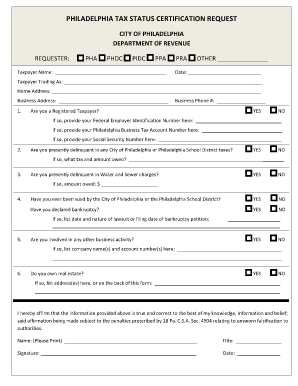
- Press the ‘Get Form’ button to access the Philadelphia Tax Clearance Certificate form and open it in your editing tool.
- Begin with the requester section where you will enter your Taxpayer Name. Specify your business classification as either PHA, PHDC, PIDC, PPA, PRA, or other relevant categories. Ensure accuracy as this information is critical for identification.
- Input the date of submission clearly in the provided field. This helps in tracking the application process.
- In the Taxpayer Trading As section, include the name under which you conduct business if it differs from your registered name.
- Fill in your Home Address and Business Address. These should be complete and updated to avoid any correspondence issues.
- Provide your Business Phone Number to facilitate communication regarding your certificate request.
- Indicate whether you are a Registered Taxpayer by marking 'Yes' or 'No.' If 'Yes,' provide your Philadelphia Business Tax Account Number and, if applicable, your Social Security Number.
- Respond to the questions regarding your current delinquency status for Water and Sewer charges and any City of Philadelphia or Philadelphia School District taxes. Be honest, as these can impact your clearance.
- Answer the questions about previous lawsuits or bankruptcy filings, detailing amounts owed and nature of any relevant actions if applicable.
- If you are involved in additional business activities, list the associated company names and account numbers.
- Declare any real estate ownership by marking 'Yes' or 'No.' If you own property, provide the address or note that it is listed on the back of the form.
- Complete the Conflict of Interest section by answering all relevant questions that inquire about familial or business relationships with City officials or entities.
- Fill out the Additional Disclosures section to declare any unresolved violations, involvement in foreclosure proceedings, or felony convictions within the required timeframe.
- Finally, affirm that the information provided is true and correct to the best of your knowledge. Include your printed name, title, signature, and date at the end of the form.
- Once all required fields are filled out and reviewed, you can save changes, download, print, or share the completed form.
Begin filling out your Philadelphia Tax Clearance Certificate online today to ensure prompt processing of your request.
Related links form
File your Form 1023 federal tax exemption application To obtain federal tax-exempt status from the IRS, you will need to complete and file IRS Form 1023, Application for Recognition of Exemption Under Section 501(c)(3) of the Internal Revenue Code.