Loading
Get Sba Loan Application - Pacific Commerce Bank
How it works
-

Open form follow the instructions
-

Easily sign the form with your finger
-

Send filled & signed form or save
How to fill out the Sba Loan Application - Pacific Commerce Bank online
Filling out the Sba Loan Application is an important step for individuals seeking financing through Pacific Commerce Bank. This guide will provide clear and concise instructions on how to complete the application online, ensuring that you have all the necessary information for a successful submission.
Follow the steps to effectively complete your Sba Loan Application.
- Click ‘Get Form’ button to obtain the form and open it in the editor. This button will allow you to access the Sba Loan Application directly.
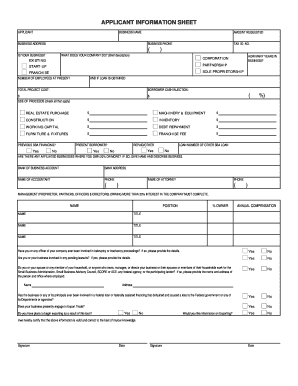
- Complete the Applicant Information Sheet. In this section, provide your business name, address, contact information, and the amount requested. Indicate the type of business (e.g., corporation, partnership) and briefly describe what your company does.
- Fill out the Personal Financial Statement for all owners, partners, and key individuals with significant ownership. Ensure that this document is dated no more than 45 days old.
- Prepare the Management Resume(s) for all individuals referenced in the personal financial statements. Ensure each resume is thorough and covers relevant education and work history.
- Complete the Business Debt Schedule, accurately recording all outstanding business liabilities. Ensure this document is also dated consistently with the Interim Business Financial Statement.
- Document the History of Business by detailing the nature of the business, key customers, major competitors, accomplishments, and future plans for growth.
- Gather Business Financial Statements and Complete Tax Returns for the previous three years. This section requires income statements, balance sheets, and all corresponding tax return schedules.
- Prepare the Interim Business Financial Statement, ensuring it reflects data no older than 45 days. Include your current income statement and balance sheet.
- Fill out the Projections Worksheet, outlining annual income and expense projections for the next two years.
- If applicable, include Accounts Receivable and Accounts Payable Agings as of the date of the Interim Business Financial Statement.
- Compile any additional required documents, such as a Business Plan, Copy of Purchase Agreement, Environmental Questionnaire, or Escrow Instructions if applicable.
- Review all sections to ensure accuracy and completeness. Make any necessary edits or adjustments before finalizing the form.
- Once all components of the application are complete, save changes, and download or print the final version of the Sba Loan Application for your records.
Start completing your Sba Loan Application online today!
How can I check on my loan status? Mailed Application? Call SBA Customer Service 800 659 -2955.