We use cookies to improve security, personalize the user experience, enhance our marketing activities (including cooperating with our marketing partners) and for other business use.
Click "here" to read our Cookie Policy. By clicking "Accept" you agree to the use of cookies. Read less
Read more
Accept
Loading
Form preview
  • US Legal Forms
  • Form Library
  • More Forms
  • More Multi-State Forms
  • Association Of Pharmacy Professionals Membership Form Kindly Enroll Me As Member Of The Association

Get Association Of Pharmacy Professionals Membership Form Kindly Enroll Me As Member Of The Association

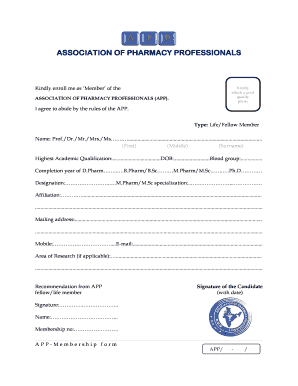
ASSOCIATION OF PHARMACY PROFESSIONALS MEMBERSHIP FORM Kindly enroll me as Member of the ASSOCIATION OF PHARMACY PROFESSIONALS (APP). Kindly attach a good quality photo I agree to abide by the rules.

How it works

  1. Open form

    Open form follow the instructions

  2. Easily sign form

    Easily sign the form with your finger

  3. Share form

    Send filled & signed form or save

How to fill out the ASSOCIATION OF PHARMACY PROFESSIONALS MEMBERSHIP FORM online

This guide provides clear and detailed instructions on how to complete the ASSOCIATION OF PHARMACY PROFESSIONALS MEMBERSHIP FORM online. Whether you are a first-time applicant or seeking to renew your membership, these steps will ensure you fill out the form accurately and efficiently.

Follow the steps to successfully complete the membership form.

  1. Click 'Get Form' button to obtain the form and open it in the editor.
  2. Begin by selecting your membership type: Life or Fellow Member. This option indicates the level of membership you are seeking within the association.
  3. Fill in your name in the designated fields: First, Middle, and Surname. Ensure that your name is correctly spelled as it will be used on official documents.
  4. Indicate your highest academic qualification, date of birth, and blood group. This information is essential for the association's records.
  5. List your academic qualifications by completing the fields for D.Pharm, B.Pharm/B.Sc, M.Pharm/M.Sc, and Ph.D if applicable. Provide the completion year for each degree.
  6. Enter your current designation and, if applicable, your M.Pharm/M.Sc specialization. This helps the association understand your professional background.
  7. Provide your affiliation information. This may include your current employer or institution, which is crucial for networking purposes.
  8. Complete the mailing address section with your current address, ensuring all details are accurate for correspondence.
  9. Fill in your mobile number and email address. This ensures you can be contacted regarding your membership status.
  10. If relevant, indicate your area of research. This helps the association support relevant initiatives within your field.
  11. Obtain a recommendation from an APP fellow or life member if required. Include their signature and name as part of your application.
  12. Sign and date the form at the designated area to confirm your agreement with the association's rules.
  13. Attach a recent high-quality photo in JPEG format. This is needed for your membership certificate.
  14. Submit the completed form via email to the provided addresses, ensuring you include both the filled form and your photo.
  15. Communicate the membership fee of Rs 2000 (+ Rs 25 for bank charges) through bank transfer or by sending a demand draft along with the physical form if preferred.
  16. At the conclusion of the process, ensure you save any changes made to your form and document your submission for future reference.

Complete your application online to become a member of the ASSOCIATION OF PHARMACY PROFESSIONALS today!

Get form

Experience a faster way to fill out and sign forms on the web. Access the most extensive library of templates available.
Get form

Related content

Report of the initiatory proceedings of the...
beenprinted for distribution, not only among its own members, but ... in the State...
Learn more
PAA Membership | School of Pharmacy
Your membership in the UW Pharmacy Alumni Association makes possible student ... Both...
Learn more
Technical translation - Wikipedia
Technical translation is a type of specialized translation involving the translation of...
Learn more

Related links form

Internet Direct Mail Campaign From Development To Results Analysis Instruc Iuni De Utilizare A Serviciului De Depunere A Declara Iilor On-line NATIONWIDE CHILDRENS Business Critical Support Handbook For Large Enterprises - March ...

Questions & Answers

Get answers to your most pressing questions about US Legal Forms API.

Contact support

Open the Page layout menu. This will open a selection of editing options at the top of the editor. Click Adjust Page Breaks. This will cause Add page break buttons to appear throughout the resume.

You can drag-and-drop page breaks horizontally and vertically. If this isn't working, you can check that drag-and-drop is enabled. To do that, go to File > Options. If you're using Excel 2007, click the Microsoft Office Button icon (in the top left corner of the program) > Excel Options.

Adjust automatic page breaks On the Format menu, select Paragraph, and then select the Line and Page Breaks tab. Clear the Keep lines together, Keep with next, and Page break before check boxes.

Remove a page break from a Word document On the Home tab, in the Paragraph group, click Show/Hide to show all formatting marks including page breaks. Double-click the page break to select it, then press Delete. Click Show/Hide again to hide the remaining formatting marks in the document.

1:30 3:27 And remove page break now if you want to delete all manual page breaks so i'll put a page break in.MoreAnd remove page break now if you want to delete all manual page breaks so i'll put a page break in. Again. If you want to delete all of the manual page breaks you go to breaks reset or page breaks.

A page break is an intentional division between pages in a Microsoft Word document. When you type a document with more than a page of words, Microsoft Word's default formatting moves the text to a new page after filling the first page. As you add or delete information, the text might move from one page to another.

Force text to the next line or page Click where you want the break to occur. Do one of the following: For a line break: Click. in the toolbar, then choose Line Break. You can also choose Insert > Line Break. For a page break: Click. in the toolbar, then choose Page Break. You can also choose Insert > Page Break.

1:04 3:41 How to Insert a Page Break in Excel - YouTube YouTube Start of suggested clip End of suggested clip Page break select a column or row respectively immediately after where you want the page break toMorePage break select a column or row respectively immediately after where you want the page break to appear. Finally click on the insert.

Delete a section break If not showing, select Home > Show/Hide. to show section breaks. Section breaks look like this: Note: The type of section break shown above is a Continuous section break; there are other types of section breaks. Place your cursor just before the section break and press Delete.

0:08 1:24 Insert or remove a page break in Microsoft Word - YouTube YouTube Start of suggested clip End of suggested clip Where you want to start a new page and then select insert page break to change the settings for howMoreWhere you want to start a new page and then select insert page break to change the settings for how word treats paragraphs. Across page breaks select layout.

Get This Form Now!

Use professional pre-built templates to fill in and sign documents online faster. Get access to thousands of forms.
Get form
If you believe that this page should be taken down, please follow our DMCA take down processhere.

Industry-leading security and compliance

US Legal Forms protects your data by complying with industry-specific security standards.
  • In businnes since 1997
    25+ years providing professional legal documents.
  • Accredited business
    Guarantees that a business meets BBB accreditation standards in the US and Canada.
  • Secured by Braintree
    Validated Level 1 PCI DSS compliant payment gateway that accepts most major credit and debit card brands from across the globe.
Get ASSOCIATION OF PHARMACY PROFESSIONALS MEMBERSHIP FORM Kindly Enroll Me As Member Of The ASSOCIATION
Get form
Form Packages
Adoption
Bankruptcy
Contractors
Divorce
Home Sales
Employment
Identity Theft
Incorporation
Landlord Tenant
Living Trust
Name Change
Personal Planning
Small Business
Wills & Estates
Packages A-Z
Form Categories
Affidavits
Bankruptcy
Bill of Sale
Corporate - LLC
Divorce
Employment
Identity Theft
Internet Technology
Landlord Tenant
Living Wills
Name Change
Power of Attorney
Real Estate
Small Estates
Wills
All Forms
Forms A-Z
Form Library
Customer Service
Terms of Service
Privacy Notice
Legal Hub
Content Takedown Policy
Bug Bounty Program
About Us
Help Portal
Legal Resources
Blog
Affiliates
Contact Us
Delete My Account
Site Map
Industries
Forms in Spanish
Localized Forms
State-specific Forms
Forms Kit
Legal Guides
Real Estate Handbook
All Guides
Prepared for You
Notarize
Incorporation services
Our Customers
For Consumers
For Small Business
For Attorneys
Our Sites
US Legal Forms
USLegal
FormsPass
pdfFiller
signNow
airSlate WorkFlow
DocHub
Instapage
Social Media
Call us now toll free:
+1 833 426 79 33
As seen in:
  • USA Today logo picture
  • CBC News logo picture
  • LA Times logo picture
  • The Washington Post logo picture
  • AP logo picture
  • Forbes logo picture
© Copyright 1997-2025
airSlate Legal Forms, Inc.
3720 Flowood Dr, Flowood, Mississippi 39232
Form Packages
Adoption
Bankruptcy
Contractors
Divorce
Home Sales
Employment
Identity Theft
Incorporation
Landlord Tenant
Living Trust
Name Change
Personal Planning
Small Business
Wills & Estates
Packages A-Z
Form Categories
Affidavits
Bankruptcy
Bill of Sale
Corporate - LLC
Divorce
Employment
Identity Theft
Internet Technology
Landlord Tenant
Living Wills
Name Change
Power of Attorney
Real Estate
Small Estates
Wills
All Forms
Forms A-Z
Form Library
Customer Service
Terms of Service
Privacy Notice
Legal Hub
Content Takedown Policy
Bug Bounty Program
About Us
Help Portal
Legal Resources
Blog
Affiliates
Contact Us
Delete My Account
Site Map
Industries
Forms in Spanish
Localized Forms
State-specific Forms
Forms Kit
Legal Guides
Real Estate Handbook
All Guides
Prepared for You
Notarize
Incorporation services
Our Customers
For Consumers
For Small Business
For Attorneys
Our Sites
US Legal Forms
USLegal
FormsPass
pdfFiller
signNow
airSlate WorkFlow
DocHub
Instapage
Social Media
Call us now toll free:
+1 833 426 79 33
As seen in:
  • USA Today logo picture
  • CBC News logo picture
  • LA Times logo picture
  • The Washington Post logo picture
  • AP logo picture
  • Forbes logo picture
© Copyright 1997-2025
airSlate Legal Forms, Inc.
3720 Flowood Dr, Flowood, Mississippi 39232