Loading
Get Nhs Reference Template
How it works
-

Open form follow the instructions
-

Easily sign the form with your finger
-

Send filled & signed form or save
How to fill out the Nhs Reference Template online
The Nhs Reference Template is a crucial document in the recruitment process, offering potential employers insights into an applicant's previous job performance and qualifications. This guide provides clear, step-by-step instructions to help users fill out the form accurately and efficiently online.
Follow the steps to complete the Nhs Reference Template effectively.
- Press the ‘Get Form’ button to access the Nhs Reference Template and open it in your preferred online editor.
- Start by entering the applicant's name and the post they are applying for in the designated fields.
- Fill in the REF number and HR contact details to ensure proper processing.
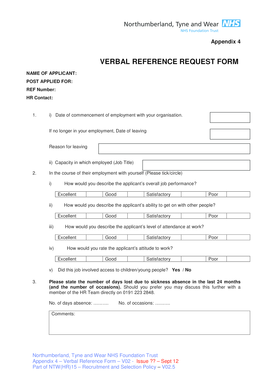
- Indicate the date when the applicant commenced employment with your organization. If they are no longer employed, also note the date of leaving and the reason for leaving.
- Specify the applicant's job title during their employment.
- Assess the applicant's overall job performance by selecting one of the following options: Excellent, Good, Satisfactory, or Poor.
- Rate the applicant's attitude to work by choosing from the same options—Excellent, Good, Satisfactory, or Poor.
- Evaluate the applicant's attendance by providing a rating of Excellent, Good, Satisfactory, or Poor.
- Describe the applicant's ability to interact with others, using the same rating options.
- Indicate whether the applicant’s job involved access to children or young people by selecting Yes or No.
- Document the number of days lost due to sickness absence in the last 24 months and any corresponding occasions.
- Answer questions regarding any disciplinary actions or warnings relevant to the applicant's post, including any knowledge of investigations or dismissals.
- Note how long you have known the applicant and in what capacity.
- Indicate whether you permit the contents of this reference to be shared with the applicant by selecting Yes or No.
- For clinical posts, provide comments on the applicant's suitability and past performance, using a separate sheet if necessary.
- Finally, ensure to sign the form, print your name, job title, and include your company name and stamp if applicable. Review all entries for accuracy.
- Save your changes, and then choose to download, print, or share the completed form as needed.
Complete your Nhs Reference Template online today for a smoother hiring process!
All reference requests should be sent to elft.references@nhs.net and should be provided by the HR Department.