Loading
Get Co Dr 2011 2017-2026
How it works
-

Open form follow the instructions
-

Easily sign the form with your finger
-

Send filled & signed form or save
How to fill out the CO DR 2011 online
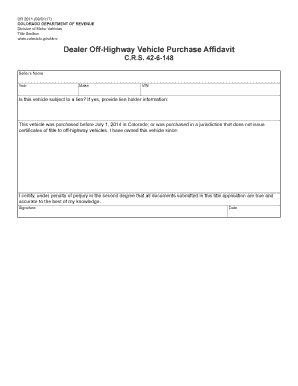
Filling out the CO DR 2011 online is a straightforward process that enables users to manage their off-highway vehicle purchase affidavit efficiently. This guide offers step-by-step instructions to ensure that you complete the form accurately and effectively.
Follow the steps to complete the CO DR 2011 online.
- Click the ‘Get Form’ button to access the document and open it for editing.
- Begin by entering the seller's name in the designated field. Ensure that the name is spelled correctly as it appears on the title.
- Next, input the year and make of the vehicle in the appropriate fields. This information is crucial for identifying the vehicle.
- Provide the Vehicle Identification Number (VIN), which is usually a 17-character alphanumeric code unique to each vehicle.
- Indicate whether the vehicle is subject to a lien. If it is, please include the lien holder's name and contact information.
- In the section regarding the purchase date, specify whether the vehicle was purchased before July 1, 2014, in Colorado or in a jurisdiction that does not issue title certificates for off-highway vehicles. Additionally, state the date you have owned this vehicle.
- Finally, review the affidavit statement regarding the accuracy of documents and conclude by signing and dating the form.
Complete your documents online to ensure a smooth and efficient filing process.