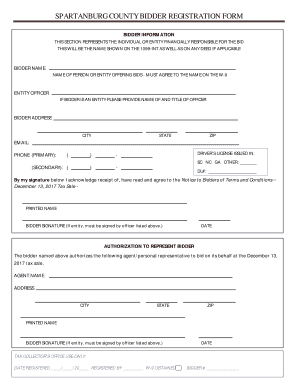
L AS ON ANY DEED IF APPLICABLE BIDDER NAME NAME OF PERSON OR ENTITY OFFERING BIDS - MUST AGREE TO THE NAME ON THE W-9 ENTITY OFFICER IF BIDDER IS AN ENTITY PLEASE PROVIDE NAME OF AND TITLE OF OFFICER BIDDER ADDRESS CITY STATE ZIP EMAIL: PHONE (PRIMARY): ( ) - (SECONDARY): ( ) - DRIVER S LICENSE ISSUED IN: SC NC GA OTHER: DL#: By my signature below I acknowledge receipt of, have read and agree to the Notice to Bidders of Terms and Conditions Decemb.

How it works
  • Open form

    Open form follow the instructions

  • Easily sign form

    Easily sign the form with your finger

  • Share form

    Send filled & signed form or save

How to fill out the SC Bidder Registration Form - Spartanburg County online

Filling out the SC Bidder Registration Form for Spartanburg County online is a straightforward process. This guide will walk you through each section of the form, ensuring that you provide all necessary information accurately and efficiently.

Follow the steps to complete the SC Bidder Registration Form online.

  1. Click ‘Get Form’ button to access the SC Bidder Registration Form and open it in your preferred online tool.
  2. Enter your bidder name in the designated field. This should be the name of the individual or entity that will be financially responsible for the bid, and it must match the name provided on the W-9 form.
  3. If you are registering as an entity, provide the name and title of an authorized officer in the ‘Entity Officer’ section.
  4. Fill out your bidder address, including the city, state, and ZIP code.
  5. Enter your email address and primary phone number in the appropriate fields. Optionally, provide a secondary phone number.
  6. Indicate the state where your driver’s license was issued. Choose from South Carolina, North Carolina, Georgia, or other, and enter your driver’s license number in the corresponding field.
  7. Acknowledge the receipt of the Notice to Bidders of Terms and Conditions by signing and printing your name in the provided space.
  8. If you are an entity, ensure the form is signed by the authorized officer listed earlier.
  9. Enter today’s date in the designated field.
  10. To authorize a personal representative to bid on your behalf, provide their name and address, including city, state, and ZIP code in the ‘Authorization to Represent Bidder’ section.
  11. Repeat the signature process by signing and printing your name again for the authorized agent if you are an entity.
  12. Finally, review all entries for accuracy before submitting. You may save your changes, download, print, or share the completed form as needed.

Begin your registration process and complete the SC Bidder Registration Form online today!

Get form

Experience a faster way to fill out and sign forms on the web. Access the most extensive library of templates available.

Related content

Month '93 Volume 1.1 - SC Procurement Services...

Aug 7, 2017 — Vendor Registration: ... A Pre-Bid Meeting (Non-Mandatory) will be held at...

Learn more
Purchasing and Operations : Spartanburg Community...

Spartanburg, SC 29305. Fax: Spartanburg Community College Attn: Tami Steed (864) 592-4642...

Learn more
Questions & Answers

Get answers to your most pressing questions about US Legal Forms API.

Contact support

How do I make my text look good on a logo?

From Script to Sans-Serif, there are tons of typeface options to choose from. Look for fonts with interesting details to their letters, and whose silhouette suits the overall look of your brand. Most importantly, avoid logo fonts that resemble your competitors' too closely.

Here's how to design the perfect logo, step-by-step. Start With Your Story. ... Brainstorm Words That Describe Your Brand. ... Sketch Ideas Based on These Words. ... Test Your Top Sketches With Your Buyer Persona. ... Refine Your Chosen Sketch. ... Develop Your Logo's Layout on a Free Design Platform. ... Pick Versatile Color Options. ... Choose a Font.

How to Make a Text Logo? Click the “Design a Text Logo Now” button to get started. Find and click "All Templates" to choose "Logo" layout, and browse “text”. ... Choose one to get started. ... Preview and save your text logo by clicking “download” to save your text logo in high resolution as a JPG, PNG, or PDF.

0:03 2:32 Design Your Own Logo - How To Edit Text (GraphicSprings) - YouTube YouTube Start of suggested clip End of suggested clip And select a different font from the drop down menu like. This. You can then adjust the size andMoreAnd select a different font from the drop down menu like. This. You can then adjust the size and position by clicking and dragging the text.

With the Text tool selected, you can edit the text just like you would any other document. You can type in new text, edit the text already there, and even format it as you see fit. PRO TIP: When editing text in Illustrator, be sure to use the Selection tool (black arrow).

While each logo is different in its own way, there are seven main categories: Emblems. Pictorial marks (or logo symbols) Wordmarks (or logotypes) Monogram logos (or lettermarks) Abstract logo marks. Mascot logos. Combination marks.

First, select the pen tool from the toolbar. Then, click on the edge of the shape that you want to edit. You can then move the points that you have selected to change the shape of the logo. You can also use other tools, such as the eraser tool, to further edit your logo.

Get This Form Now!

Use professional pre-built templates to fill in and sign documents online faster. Get access to thousands of forms.

If you believe that this page should be taken down, please follow our DMCA take down process here.

Get SC Bidder Registration Form - Spartanburg County