Loading
Form preview
  • US Legal Forms
  • Form Library
  • Foreign Forms
  • Foreign Canada Tax Forms
  • Canada T1135 E 2019

Get Canada T1135 E 2019-2026

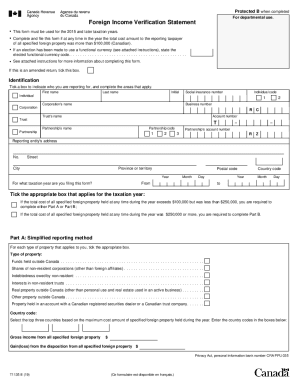
O use a functional currency (see attached instructions), state the elected functional currency code. . . . . . . . . . . . . . . . . . . . . . . . . . . . . . . . . . . . . . . . . . . . . . . . . See attached instructions for more information about completing this form. Complete and file this form if at any time in the year the total cost amount to the reporting taxpayer of all specified foreign property was more than $100,000 (Canadian). If this is an amended return, tick this box. Id.

How it works

  1. Open form

    Open form follow the instructions

  2. Easily sign form

    Easily sign the form with your finger

  3. Share form

    Send filled & signed form or save

How to fill out the Canada T1135 E online

Filling out the Canada T1135 E form, also known as the Foreign Income Verification Statement, is essential for Canadian taxpayers who have specified foreign property exceeding a certain value. This guide provides a user-friendly step-by-step approach to help you complete the form accurately and efficiently online.

Follow the steps to complete the T1135 E form online.

  1. Press the ‘Get Form’ button to access the T1135 E form and open it for editing.
  2. Indicate your identification by ticking the appropriate box that applies to you, whether you are an individual, corporation, trust, or partnership. Fill in the required fields including first name, last name, and social insurance number where applicable.
  3. Specify the taxation year for which you are filing the form. Enter the year in the provided fields.
  4. Determine if the total cost of all specified foreign property held during the year exceeds $100,000 but is less than $250,000 or was $250,000 or more. Select Part A or Part B accordingly.
  5. If completing Part A, tick the boxes for the types of specified foreign property you hold, including funds held outside Canada, shares of non-resident corporations, and more.
  6. For Part B, fill in the detailed tables for each category of specified foreign property. Include necessary details such as country codes, descriptions, maximum cost amounts, and any income or gains/losses associated with each property.
  7. Once all information is accurately entered, certify that the information provided is correct by signing in the certification section, including your name, title, and date.
  8. Finally, save your changes to the form, and you have the option to download, print, or share the completed T1135 E form.

Complete your T1135 E form online now to ensure compliance with reporting requirements.

Get form

Experience a faster way to fill out and sign forms on the web. Access the most extensive library of templates available.
Get form

Related content

IRS Reminds Those with Foreign Assets of U.S. Tax...
Apr 13, 2017 - The form is only available through the BSA E-Filing System website. ... IRS...
Learn more
T1135 late filing penalty relief
T1135 late filing penalty relief. ... The Canada Revenue Agency (CRA) can impose penalties...
Learn more
scudo fiscale - Tax amnesty - qwe.wiki
Il condono fiscale è menzionato dalla Canada Revenue Agency come il ... come in mare...
Learn more

Related links form

MI Court Of Appeals Docketing Statement 2019 Samet Corporation Site Specific Safety Plan 2017 Long & Foster Real Estate LF1006 2007 Georgia State University Substitute W-9 & Vendor Authorization Form 2014

Questions & Answers

Get answers to your most pressing questions about US Legal Forms API.

Contact support

Who has to file a T1135? A T1135 must be filed by: Canadian resident individuals, corporations and trusts that, at any time during the year, own specified foreign property costing more than $100,000; and. certain partnerships that hold more than $100,000 of specified foreign property.

Individuals can file Form T1135 electronically (EFILE or NETFILE) for the 2015 and later tax years. Corporations can EFILE Form T1135 electronically for the 2014 and later tax years.

A partnership has to file a Form T1135 if it is a specified Canadian entity and, at any time during the reporting period, the total cost amount of all specified foreign property it held was more than $100,000.

When You Need to Report Foreign Property This property includes bank accounts, stocks, bonds and real estate. Even if you have stocks and bonds held in Canadian brokerage accounts, you need to report them. You make the declaration on Form T1135, Foreign Income Verification Statement.

Introduction CRA Offshore Assets Form T1135 Foreign Investment Verification, or T1135, is a form that must be filed with Canada Revenue Agency (CRA) by anyone who, at any time during the year, owns foreign property valued more than $100,000 in Canadian currency.

Form T1135, Foreign Income Verification Statement, must be filed by: Canadian resident individuals, corporations, and certain trusts that, at any time during the year, own specified foreign property costing more than $100,000. certain partnerships that hold more than $100,000 of specified foreign property.

It can be attached to the tax return or partnership information return, and mailed to your tax centre, or can be mailed separately to the Ottawa Technology Centre. The address of the Ottawa Technology Centre is on the T1135 form. The T1135 is a fillable form which will expand if more rows of input are required.

The T1135 form is a Foreign Income Verification Statement that some taxpayers must complete and submit along with their personal returns to the CRA every taxation year. Its purpose is to alert the CRA to the offshore property a Canadian taxpayer may own, increasing transparency to the CRA from the taxpayer.

If you choose to paper file the T1135, you must either attach it to your paper-filed tax return (or partnership information return), or submit it separately, and send it to the Winnipeg Tax Centre by the filing-due date. If you need more space, attach a schedule to your form.

Get This Form Now!

Use professional pre-built templates to fill in and sign documents online faster. Get access to thousands of forms.
Get form
If you believe that this page should be taken down, please follow our DMCA take down processhere.

Industry-leading security and compliance

US Legal Forms protects your data by complying with industry-specific security standards.
  • In businnes since 1997
    25+ years providing professional legal documents.
  • Accredited business
    Guarantees that a business meets BBB accreditation standards in the US and Canada.
  • Secured by Braintree
    Validated Level 1 PCI DSS compliant payment gateway that accepts most major credit and debit card brands from across the globe.
Get Canada T1135 E
Get form
Form Packages
Adoption
Bankruptcy
Contractors
Divorce
Home Sales
Employment
Identity Theft
Incorporation
Landlord Tenant
Living Trust
Name Change
Personal Planning
Small Business
Wills & Estates
Packages A-Z
Form Categories
Affidavits
Bankruptcy
Bill of Sale
Corporate - LLC
Divorce
Employment
Identity Theft
Internet Technology
Landlord Tenant
Living Wills
Name Change
Power of Attorney
Real Estate
Small Estates
Wills
All Forms
Forms A-Z
Form Library
Customer Service
Your Privacy Choices
Terms of Service
Privacy Notice
Legal Hub
Content Takedown Policy
Bug Bounty Program
About Us
Help Portal
Legal Resources
Blog
Affiliates
Contact Us
Delete My Account
Site Map
Industries
Forms in Spanish
Localized Forms
State-specific Forms
Forms Kit
Legal Guides
Real Estate Handbook
All Guides
Prepared for You
Notarize
Incorporation services
Our Customers
For Consumers
For Small Business
For Attorneys
Our Sites
US Legal Forms
USLegal
FormsPass
pdfFiller
signNow
altaFlow
DocHub
Instapage
Social Media
Call us now toll free:
+1 833 426 79 33
As seen in:
  • USA Today logo picture
  • CBC News logo picture
  • LA Times logo picture
  • The Washington Post logo picture
  • AP logo picture
  • Forbes logo picture
© Copyright 1997-2026
airSlate Legal Forms, Inc.
3720 Flowood Dr, Flowood, Mississippi 39232
Form Packages
Adoption
Bankruptcy
Contractors
Divorce
Home Sales
Employment
Identity Theft
Incorporation
Landlord Tenant
Living Trust
Name Change
Personal Planning
Small Business
Wills & Estates
Packages A-Z
Form Categories
Affidavits
Bankruptcy
Bill of Sale
Corporate - LLC
Divorce
Employment
Identity Theft
Internet Technology
Landlord Tenant
Living Wills
Name Change
Power of Attorney
Real Estate
Small Estates
Wills
All Forms
Forms A-Z
Form Library
Customer Service
Your Privacy Choices
Terms of Service
Privacy Notice
Legal Hub
Content Takedown Policy
Bug Bounty Program
About Us
Help Portal
Legal Resources
Blog
Affiliates
Contact Us
Delete My Account
Site Map
Industries
Forms in Spanish
Localized Forms
State-specific Forms
Forms Kit
Legal Guides
Real Estate Handbook
All Guides
Prepared for You
Notarize
Incorporation services
Our Customers
For Consumers
For Small Business
For Attorneys
Our Sites
US Legal Forms
USLegal
FormsPass
pdfFiller
signNow
altaFlow
DocHub
Instapage
Social Media
Call us now toll free:
+1 833 426 79 33
As seen in:
  • USA Today logo picture
  • CBC News logo picture
  • LA Times logo picture
  • The Washington Post logo picture
  • AP logo picture
  • Forbes logo picture
© Copyright 1997-2026
airSlate Legal Forms, Inc.
3720 Flowood Dr, Flowood, Mississippi 39232