Loading
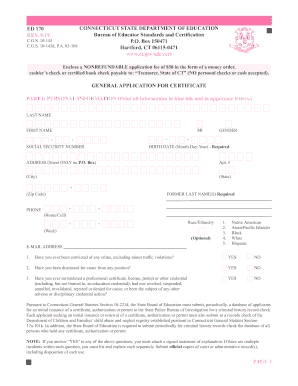
Get Ct Ed 170 2019-2026
How it works
-

Open form follow the instructions
-

Easily sign the form with your finger
-

Send filled & signed form or save
How to fill out the CT ED 170 online
This guide provides a comprehensive overview of the CT ED 170 form, designed for applicants seeking educator certification in Connecticut. By following these steps, users can efficiently complete the form online, ensuring all necessary information is accurately captured.
Follow the steps to complete the CT ED 170 form online.
- Click ‘Get Form’ button to access the CT ED 170. This will allow you to open the form in an online editor.
- Begin with Part I: Personal information. Enter your last name, first name, middle initial, social security number, date of birth, and gender. Ensure all information is printed in blue ink and uppercase letters.
- Provide your address, including street address (no P.O. box), city, state, and zip code. If applicable, list any former last names.
- Include your phone numbers (home/cell and work) and email address. You may also select your race/ethnicity from the provided options.
- Respond to the legal questions regarding any past criminal convictions or professional dismissals. Attach a signed statement explaining any 'YES' answers, along with official documentation as required.
- In Part II, list the certification endorsements you are requesting, referencing the enclosed code list for accuracy.
- For Part III, provide details about your educational background, including names of colleges or universities attended, major field of study, year of graduation, and any degrees awarded.
- In Part IV, summarize your teaching, administrative, or special service experience from the last ten years, starting with your most recent position. Include relevant job titles and the names of the institutions.
- Complete Part V, indicating whether you hold or have held an out-of-state certificate. Attach copies as necessary.
- Conclude with Part VII: Applicant attestation. Certify that the information provided is accurate and sign the application, dating it appropriately.
- Finally, ensure all changes are saved, and use the options available to download, print, or share the completed form as needed.
Start your application process today by completing the CT ED 170 online.