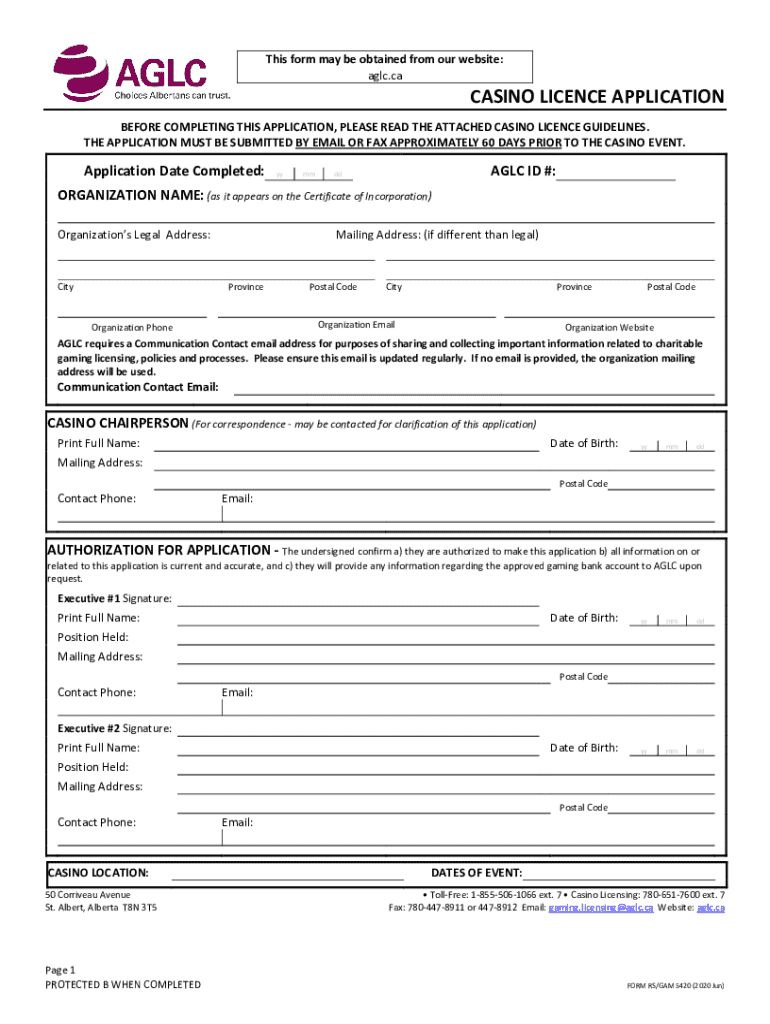
(Casino Event Details, Electronic Funds Transfer (EFT) Request & Volunteer Worker Applications) and must be completed in full prior to submission. Applications will not be processed if all required information has not been completed and supporting documents have not been included. Casino Licence Applications must be submitted at least sixty (60) days prior to the scheduled casino event. Casino Event Details Please ensure all sections of the licence application are completed in full by compl.
Loading

Open form follow the instructions

Easily sign the form with your finger

Send filled & signed form or save
How to fill out and sign Canada RS/GAM 5420 online?
Get your online template and fill it in using progressive features. Enjoy smart fillable fields and interactivity.Follow the simple instructions below:
Feel all the key benefits of submitting and completing legal documents on the internet. With our platform completing Canada RS/GAM 5420 usually takes a matter of minutes. We make that achievable through giving you access to our feature-rich editor effective at changing/fixing a document?s original text, inserting special fields, and e-signing.
Fill out Canada RS/GAM 5420 in just several minutes by following the recommendations listed below:
- Select the document template you want in the library of legal form samples.
- Click on the Get form button to open the document and move to editing.
- Fill in the required fields (they will be yellow-colored).
- The Signature Wizard will enable you to put your e-autograph right after you?ve finished imputing info.
- Insert the relevant date.
- Double-check the entire form to make certain you have filled in all the data and no changes are needed.
- Click Done and download the resulting form to the device.
Send your new Canada RS/GAM 5420 in a digital form when you are done with completing it. Your data is well-protected, as we adhere to the newest security standards. Become one of millions of happy clients that are already filling out legal documents straight from their houses.
Tips on how to fill out, edit and sign Canada RS/GAM 5420 online
How to fill and sign Canada RS/GAM 5420
Get your online template and fill it in using progressive features. Enjoy smart fillable fields and interactivity.Follow the simple instructions below:
Feel all the key benefits of submitting and completing legal documents on the internet. With our platform completing Canada RS/GAM 5420 usually takes a matter of minutes. We make that achievable through giving you access to our feature-rich editor effective at changing/fixing a document?s original text, inserting special fields, and e-signing.
Fill out Canada RS/GAM 5420 in just several minutes by following the recommendations listed below:
- Select the document template you want in the library of legal form samples.
- Click on the Get form button to open the document and move to editing.
- Fill in the required fields (they will be yellow-colored).
- The Signature Wizard will enable you to put your e-autograph right after you?ve finished imputing info.
- Insert the relevant date.
- Double-check the entire form to make certain you have filled in all the data and no changes are needed.
- Click Done and download the resulting form to the device.
Send your new Canada RS/GAM 5420 in a digital form when you are done with completing it. Your data is well-protected, as we adhere to the newest security standards. Become one of millions of happy clients that are already filling out legal documents straight from their houses.
How to edit Canada RS/GAM 5420
Choose the right Canada RS/GAM 5420 template and modify it on the spot. Streamline your paperwork with a smart document editing solution for online forms.
Your daily workflow with documents and forms can be more efficient when you have everything you need in one place. For instance, you can find, get, and modify Canada RS/GAM 5420 in just one browser tab. Should you need a specific Canada RS/GAM 5420, it is simple to find it with the help of the smart search engine and access it right away. You do not have to download it or look for a third-party editor to modify it and add your data. All of the tools for efficient work go in just one packaged solution.
This modifying solution allows you to modify, fill, and sign your Canada RS/GAM 5420 form right on the spot. Once you discover an appropriate template, click on it to open the modifying mode. Once you open the form in the editor, you have all the needed instruments at your fingertips. You can easily fill in the dedicated fields and remove them if needed with the help of a simple yet multifunctional toolbar. Apply all the changes right away, and sign the form without exiting the tab by simply clicking the signature field. After that, you can send or print out your file if necessary.
Make more custom edits with available instruments.
- Annotate your file with the Sticky note tool by putting a note at any spot within the document.
- Add necessary visual components, if required, with the Circle, Check, or Cross instruments.
- Modify or add text anywhere in the document using Texts and Text box instruments. Add content with the Initials or Date tool.
- Modify the template text with the Highlight and Blackout, or Erase instruments.
- Add custom visual components with the Arrow and Line, or Draw tools.
Discover new options in efficient and trouble-free paperwork. Find the Canada RS/GAM 5420 you need in minutes and fill it out in in the same tab. Clear the mess in your paperwork for good with the help of online forms.
How to fill and sign Canada RS/GAM 5420
Get your online template and fill it in using progressive features. Enjoy smart fillable fields and interactivity.Follow the simple instructions below:
Feel all the key benefits of submitting and completing legal documents on the internet. With our platform completing Canada RS/GAM 5420 usually takes a matter of minutes. We make that achievable through giving you access to our feature-rich editor effective at changing/fixing a document?s original text, inserting special fields, and e-signing.
Fill out Canada RS/GAM 5420 in just several minutes by following the recommendations listed below:
- Select the document template you want in the library of legal form samples.
- Click on the Get form button to open the document and move to editing.
- Fill in the required fields (they will be yellow-colored).
- The Signature Wizard will enable you to put your e-autograph right after you?ve finished imputing info.
- Insert the relevant date.
- Double-check the entire form to make certain you have filled in all the data and no changes are needed.
- Click Done and download the resulting form to the device.
Send your new Canada RS/GAM 5420 in a digital form when you are done with completing it. Your data is well-protected, as we adhere to the newest security standards. Become one of millions of happy clients that are already filling out legal documents straight from their houses.
Experience a faster way to fill out and sign forms on the web. Access the most extensive library of templates available.
Related content
remarkably similar to and are slightly lower than the average groundwater chloride...
www.aepcp.net ISSN 1136-5420/14 ... Abstract: Serious games (computerised interventions...
The EuroLeague, known as the Turkish Airlines EuroLeague for sponsorship reasons, is the...
Use professional pre-built templates to fill in and sign documents online faster. Get access to thousands of forms.
If you believe that this page should be taken down, please follow our DMCA take down process here.