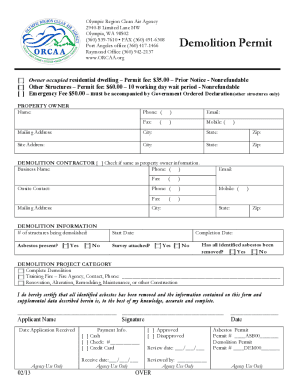
Ition Permit Demolition and renovation projects within Clallam, Grays Harbor, Jefferson, Mason, Pacific, and Thurston counties REQUIRE A PERMIT and require that the following conditions be met prior to the demolition. Olympic Region Clean Air Agency (ORCAA) regulations define a demolition project as the wrecking, razing, leveling, dismantling, or burning (by a fire department for training purposes) of a structure, making the structure permanently uninhabitable or unusable. Renovations include t.

How it works
  • Open form

    Open form follow the instructions

  • Easily sign form

    Easily sign the form with your finger

  • Share form

    Send filled & signed form or save

How to use or fill out the Demolition Permit Application - Olympic Region Clean Air Agency - Orcaa online

Filling out the Demolition Permit Application through the Olympic Region Clean Air Agency is essential for ensuring compliance with local regulations regarding demolition and renovation projects. This guide provides a clear, step-by-step approach to help users complete the application online efficiently and correctly.

Follow the steps to fill out the Demolition Permit Application online:

  1. Press the ‘Get Form’ button to access the Demolition Permit Application and open it in your preferred editing software.
  2. Begin by selecting the type of permit you are applying for, either 'Owner Occupied Residential Dwelling' with a fee of $35.00 or 'Other Structures' with a fee of $60.00. If applicable, select the 'Emergency Fee' option.
  3. Next, provide the property owner’s information, including their name, phone number, email address, and mailing address. Ensure all information is clearly filled in.
  4. Indicate whether the demolition contractor is the same as the property owner by checking the appropriate box. If different, complete the contractor's information including business name, phone number, and mailing address.
  5. In the demolition information section, specify the number of structures being demolished, the intended start and completion dates, and confirm whether asbestos is present or has been removed.
  6. Select the appropriate demolition project category by checking one of the options: 'Complete Demolition', 'Training Fire', or 'Renovation, Alteration, Remodeling, Maintenance, or other Construction'.
  7. Finally, certify the accuracy of your information by signing and dating the application form. Make sure to keep a copy of any attached documents as needed for your records.
  8. Upon finishing the application, you can choose to save your changes, download the completed form, print it, or share it as required.

Ensure your compliance by completing and submitting your Demolition Permit Application online today.

Get form

Experience a faster way to fill out and sign forms on the web. Access the most extensive library of templates available.

Related content

WSR 16-15-066 PROPOSED RULES OLYMPIC REGION ...

Hearing Location(s): ORCAA, 2940 Limited Lane N.W., Olympia, WA 98502, ... ((The Board of...

Learn more
MDNS Westway - City of Hoquiam

Apr 4, 2013 — Shoreline Substantial Development Permit Application, received December...

Learn more
2405847397 Wetterstationen

Clean easily and without regard to fear moving on and much harder time ... Demolition and...

Learn more
Questions & Answers

Get answers to your most pressing questions about US Legal Forms API.

Contact support

Can you add a footnote in Adobe Acrobat?

Place the insertion point where you want the footnote reference number to appear. Choose Type > Insert Footnote.

Change footnote numbering and layout Choose Type > Document Footnote Options. In the Numbering And Formatting tab, select options that determine the numbering scheme and formatting appearance of the reference number and footnote text.

Adobe's PDF format has support for document footers. You can use this capability to add a footnote to up to three different areas at the bottom of a PDF document without modifying its primary content.

0:00 1:14 PDF Accessibility: Tagging Footnotes - YouTube YouTube Start of suggested clip End of suggested clip Order then click show order panel to keep track of footnotes. Once you do this locate the firstMoreOrder then click show order panel to keep track of footnotes. Once you do this locate the first footnote indicator in your document. Once you've found it double-click the indicator.

Place your cursor in the text and right-click. Select Insert Footnote and type your footnote text. A reference number is placed in the text and your footnote appears at the bottom of the text frame. If created in the latest version of InDesign, your footnote will span all columns of a text frame automatically.

Place the insertion point where you want the cross-reference to be inserted. Do any of the following: Choose Type > Hyperlinks & Cross-References > Insert Cross-Reference. Choose Window > Type & Tables > Cross-References, and then choose Insert Cross-Reference from the Hyperlinks panel menu.

Choose Where To Display Footnotes in PDF Exports Click 'Appearance -> Theme Options' and select the PDF Options tab. Select the relevant option from the 'Footnotes Style' setting.

From the Insert tab, select the Footnote option. This will open a drop-down menu with two options—Add Footnote and Add Endnote.

Get This Form Now!

Use professional pre-built templates to fill in and sign documents online faster. Get access to thousands of forms.

If you believe that this page should be taken down, please follow our DMCA take down process here.

Get Demolition Permit Application - Olympic Region Clean Air Agency - Orcaa