We use cookies to improve security, personalize the user experience, enhance our marketing activities (including cooperating with our marketing partners) and for other business use.
Click "here" to read our Cookie Policy. By clicking "Accept" you agree to the use of cookies. Read less
Read more
Accept
Loading
Form preview
  • US Legal Forms
  • Form Library
  • More Forms
  • More Multi-State Forms
  • Schools Personal Accident Claim Form - Brennan Insurances - Brennaninsurances

Get Schools Personal Accident Claim Form - Brennan Insurances - Brennaninsurances

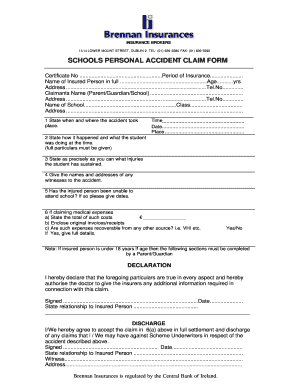
INSURANCE BROKERS 12/14 LOWER MOUNT STREET, DUBLIN 2. TEL: (01) 639 5580 FAX: (01) 639 5590 SCHOOLS PERSONAL ACCIDENT CLAIM FORM Certificate No .......................................................Period.

How it works

  1. Open form

    Open form follow the instructions

  2. Easily sign form

    Easily sign the form with your finger

  3. Share form

    Send filled & signed form or save

How to fill out the SCHOOLS PERSONAL ACCIDENT CLAIM FORM - Brennan Insurances - Brennaninsurances online

Filing a personal accident claim can be a straightforward process when you understand how to accurately complete the necessary form. This guide will walk you through the SCHOOLS PERSONAL ACCIDENT CLAIM FORM provided by Brennan Insurances, helping you submit your claim with confidence.

Follow the steps to successfully complete the form.

  1. Locate the ‘Get Form’ button to access the Schools Personal Accident Claim Form and open it in your preferred viewing application.
  2. Begin by filling in the Certificate Number and the Period of Insurance. This is usually found on your policy documentation.
  3. Enter the full name of the insured person along with their age in years. It is important to ensure this information is accurate.
  4. Provide the complete address and telephone number of the insured person. This information helps facilitate communication.
  5. Include the claimants name, who can be a parent, guardian, or representative from the school, along with their address and telephone number.
  6. Fill in the name of the school and the class of the insured person. Additionally, provide the school's address.
  7. In the first section, specify the time, date, and place where the accident occurred.
  8. Describe how the accident happened and what the student was doing at the time. It is important to provide thorough details.
  9. Clearly state the injuries sustained by the student.
  10. Provide the names and addresses of any witnesses who were present during the accident.
  11. Indicate whether the injured person has been unable to attend school due to the injuries, and if so, list the relevant dates.
  12. If applicable, enter the total medical expenses incurred in section six, and include original invoices or receipts.
  13. Indicate whether the medical expenses can be recovered from another source, such as a health insurance provider, and supply any necessary details.
  14. If the insured person is under 18 years of age, a parent or guardian must complete the relevant sections.
  15. Complete the declaration section by signing and dating the form. Include your relationship to the insured person.
  16. In the discharge section, sign and date to acknowledge acceptance of the claim amount and discharge of future claims. Provide your relationship to the insured person.
  17. If necessary, have a witness sign the form and provide their address.
  18. Finally, save your changes, download, print, or share the form as required.

Begin completing your claim online today to ensure a prompt processing of your request.

Get form

Experience a faster way to fill out and sign forms on the web. Access the most extensive library of templates available.
Get form

Related content

Prescription drug insurance coverage and patient...
Previous reviews have shown that changes in prescription drug insurance benefits can...
Learn more
150923 SJCSD Benefits Book 2016.pub
the benefits provided to you by St. Johns County School District. Staff from HR Benefits...
Learn more
Bath School disaster - Wikipedia
Motive, Psychopathy, revenge for defeat in local election, personal and financial stress...
Learn more

Related links form

Submitting Your Dissertation/Thesis Via ETD Administrator 2011-2012 Course Work Plan Morgridge College Of Education ... SELF SERVICE BANNER (SSB) ACCESS J-1 TRANSFER REQUEST - University Of Denver

Questions & Answers

Get answers to your most pressing questions about US Legal Forms API.

Contact support

To convert your logo to a PDF, follow these steps: Click File on the top toolbar of your design program. Choose the Print option. In the Printer selection drop-down, select Print to PDF.

The "Permissions" setting controls restrictions that can be placed on the PDF file. To prevent the text and graphics from being copied from the PDF file, uncheck the "Allow text and graphics to be copied" option. You must always enter a master password when security options are enabled.

This is done in Acrobat, not in InDesign: Open the PDF in Acrobat. File > Properties > Security > Security Method > Password Security. Disable "Enable copying of text, images and other content" Add a permissions password, OK, Confirm, OK.

How to add passwords and permissions to PDF files: Open a file in Acrobat and choose “Tools” > “Protect.” Select whether you want to restrict editing with a password or encrypt the file with a certificate or password. Set password or security method as desired. Click “OK” and then click “Save.”

Protect PDF from Copying and Editing Go to the "Protect" tab, and click the "Set Password" button. Then select the "Permission Password" option. Uncheck "Enable copying of text, images and other content" and enter your desired password. Once confirmed, click on the "Save" button to apply, and save your PDF file.

In some cases, the secured PDF's security settings may allow you to view the PDF but restrict the ability to copy or print. In a pinch, you can take a screenshot of the text you want to copy and paste the image into another document or filetype.

Add a password to Adobe Acrobat (pdf) Open the PDF and choose Tools > Protect > Encrypt > Encrypt with Password. If you receive a prompt, click Yes to change the security. Select Require a Password to Open the Document, then type the password in the corresponding field.

Get This Form Now!

Use professional pre-built templates to fill in and sign documents online faster. Get access to thousands of forms.
Get form
If you believe that this page should be taken down, please follow our DMCA take down processhere.

Industry-leading security and compliance

US Legal Forms protects your data by complying with industry-specific security standards.
  • In businnes since 1997
    25+ years providing professional legal documents.
  • Accredited business
    Guarantees that a business meets BBB accreditation standards in the US and Canada.
  • Secured by Braintree
    Validated Level 1 PCI DSS compliant payment gateway that accepts most major credit and debit card brands from across the globe.
Get SCHOOLS PERSONAL ACCIDENT CLAIM FORM - Brennan Insurances - Brennaninsurances
Get form
Form Packages
Adoption
Bankruptcy
Contractors
Divorce
Home Sales
Employment
Identity Theft
Incorporation
Landlord Tenant
Living Trust
Name Change
Personal Planning
Small Business
Wills & Estates
Packages A-Z
Form Categories
Affidavits
Bankruptcy
Bill of Sale
Corporate - LLC
Divorce
Employment
Identity Theft
Internet Technology
Landlord Tenant
Living Wills
Name Change
Power of Attorney
Real Estate
Small Estates
Wills
All Forms
Forms A-Z
Form Library
Customer Service
Terms of Service
Privacy Notice
Legal Hub
Content Takedown Policy
Bug Bounty Program
About Us
Blog
Affiliates
Contact Us
Delete My Account
Site Map
Industries
Forms in Spanish
Localized Forms
State-specific Forms
Forms Kit
Legal Guides
Real Estate Handbook
All Guides
Prepared for You
Notarize
Incorporation services
Our Customers
For Consumers
For Small Business
For Attorneys
Our Sites
US Legal Forms
USLegal
FormsPass
pdfFiller
signNow
airSlate WorkFlow
DocHub
Instapage
Social Media
Call us now toll free:
+1 833 426 79 33
As seen in:
  • USA Today logo picture
  • CBC News logo picture
  • LA Times logo picture
  • The Washington Post logo picture
  • AP logo picture
  • Forbes logo picture
© Copyright 1997-2025
airSlate Legal Forms, Inc.
3720 Flowood Dr, Flowood, Mississippi 39232
Form Packages
Adoption
Bankruptcy
Contractors
Divorce
Home Sales
Employment
Identity Theft
Incorporation
Landlord Tenant
Living Trust
Name Change
Personal Planning
Small Business
Wills & Estates
Packages A-Z
Form Categories
Affidavits
Bankruptcy
Bill of Sale
Corporate - LLC
Divorce
Employment
Identity Theft
Internet Technology
Landlord Tenant
Living Wills
Name Change
Power of Attorney
Real Estate
Small Estates
Wills
All Forms
Forms A-Z
Form Library
Customer Service
Terms of Service
Privacy Notice
Legal Hub
Content Takedown Policy
Bug Bounty Program
About Us
Blog
Affiliates
Contact Us
Delete My Account
Site Map
Industries
Forms in Spanish
Localized Forms
State-specific Forms
Forms Kit
Legal Guides
Real Estate Handbook
All Guides
Prepared for You
Notarize
Incorporation services
Our Customers
For Consumers
For Small Business
For Attorneys
Our Sites
US Legal Forms
USLegal
FormsPass
pdfFiller
signNow
airSlate WorkFlow
DocHub
Instapage
Social Media
Call us now toll free:
+1 833 426 79 33
As seen in:
  • USA Today logo picture
  • CBC News logo picture
  • LA Times logo picture
  • The Washington Post logo picture
  • AP logo picture
  • Forbes logo picture
© Copyright 1997-2025
airSlate Legal Forms, Inc.
3720 Flowood Dr, Flowood, Mississippi 39232