Loading
Get Mc 322
How it works
-

Open form follow the instructions
-

Easily sign the form with your finger
-

Send filled & signed form or save
How to fill out the Mc 322 online
Filling out the Mc 322 form is an essential step in the Medi-Cal application process. This guide will provide you with clear, user-friendly instructions to help you complete the form accurately and efficiently online.
Follow the steps to fill out the Mc 322 form successfully
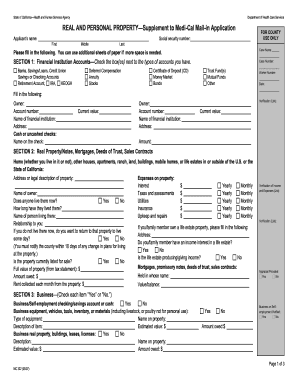
- Click the ‘Get Form’ button to access the Mc 322 form and open it in your digital editor.
- Begin by entering the applicant’s name and social security number in the designated fields. Ensure that all details are accurate to avoid processing delays.
- For Section 1, check the box next to the types of financial accounts you hold. Then, provide details such as the owner’s name, account number, and current value of each account.
- In Section 2, you will need to list real property owned, including addresses and property details. Indicate whether anyone currently resides there and provide the full value and amount owed.
- Move to Section 3 and respond to the questions regarding business ownership, marking 'Yes' or 'No' as appropriate. Include any relevant business equipment and their values.
- In Section 4, list all vehicles you own, providing details such as make and model, year, and whether they are used for business purposes. Include amounts owed if applicable.
- Section 5 requires you to indicate ownership of certain items such as jewelry or insurance policies. Be sure to provide values and ownership details.
- In Section 6, answer questions regarding any transfers of property or funds made within the last 30 months. If applicable, include detailed descriptions and dates.
- Once you have completed all sections, review your entries for accuracy. After verifying that all the information is correct, save your changes and choose to download, print, or share the completed form.
Complete your Mc 322 form online today to take the next step in your Medi-Cal application.
For Medi-Cal, you must report it within 10 days. To report changes, call Covered California at (800) 300-1506 or sign in to your online account. You can also find a Licensed Insurance Agent, Certified Enrollment Counselor or county eligibility worker who can provide free assistance in your area.