Loading
Get Lara Bpl Cosshopapp
How it works
-

Open form follow the instructions
-

Easily sign the form with your finger
-

Send filled & signed form or save
How to fill out the Lara Bpl Cosshopapp online
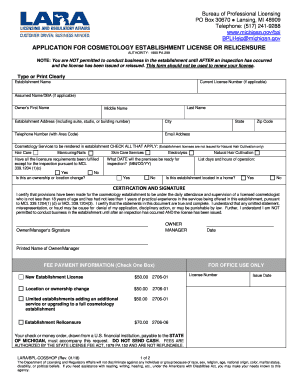
Filling out the Lara Bpl Cosshopapp is an essential step for acquiring or renewing a cosmetology establishment license. This guide offers comprehensive instructions to assist users in successfully completing the form online.
Follow the steps to fill out the form correctly.
- Click 'Get Form' button to obtain the form and launch it in the editor.
- Fill in the establishment name clearly, as it will be used for identification purposes.
- If applicable, enter the current license number and the assumed name or DBA (Doing Business As) for your establishment.
- Provide the owner's first name, last name, and middle name to ensure proper identification.
- Input the establishment address, including any suite, studio, or building number, along with the city, state, zip code, and telephone number.
- Enter the email address to allow for effective communication during the licensing process.
- Select the cosmetology services to be offered at the establishment by checking all appropriate boxes.
- Indicate whether all licensure requirements have been fulfilled, except for the inspection, by selecting 'Yes' or 'No.'
- Specify if this application involves an ownership or location change by selecting 'Yes' or 'No.'
- Provide the date when the premises will be ready for inspection, ensuring the format is MM/DD/YY.
- List the days and hours of operation for your establishment.
- Confirm whether the establishment is located in a home by selecting 'Yes' or 'No.'
- Read and complete the certification and signature section, ensuring all information is accurate, and sign as the owner or manager.
- Select the appropriate fee payment option and ensure the correct fee amount is included with your application.
- After completing all relevant sections, save your changes, and you may download, print, or share the completed form as necessary.
Start completing your Lara Bpl Cosshopapp online today for a seamless application process.
Proceed to the MiPLUS website at: .michigan.gov/miplus. If you have never opened a MiPLUS account, select Register for an Account. Scroll down and click “Register Your Account Now” located under the Register With MiPLUS title and instruction video. Registration.