Loading
Get Environmental Screening Form (esf) - National Park Service - Nps
How it works
-

Open form follow the instructions
-

Easily sign the form with your finger
-

Send filled & signed form or save
How to fill out the ENVIRONMENTAL SCREENING FORM (ESF) - National Park Service - Nps online
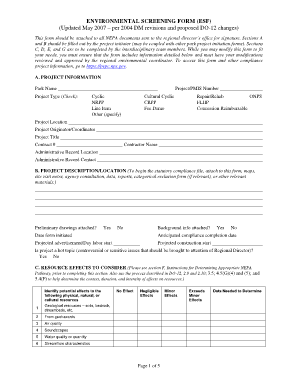
The Environmental Screening Form (ESF) is a crucial document for project initiators engaging with the National Park Service. This guide provides a detailed, step-by-step approach to completing the form online, ensuring compliance with environmental regulations.
Follow the steps to fill out the Environmental Screening Form online effectively.
- Press the ‘Get Form’ button to access the Environmental Screening Form and open it in your online editor.
- Begin filling out Section A: Project Information. Provide details such as the project or PMIS number, park name, project type, project location, and project coordinator's information. Ensure accuracy, as this information is essential for identification and communication.
- Complete Section B: Project Description/Location. Attach any relevant documents such as maps, site visit notes, and background information. Mark whether preliminary drawings are attached, and provide important dates related to project initiation and anticipated completion.
- Progress to Section C: Resource Effects to Consider. Carefully identify and assess potential effects on various physical, natural, and cultural resources. Check the appropriate boxes reflecting the degree of effect—None, Negligible, Minor, or Exceeds Minor Effects—while commenting where necessary.
- Move to Section D: Mandatory Criteria. Answer the questions regarding significant impacts on public health and safety, environmental effects, and unique geographic characteristics. Document comments or data needed to determine each criterion accurately.
- Fill out Section E: Other Information by indicating personnel familiarity with the site, any site visits made, and whether the project is consistent with approved plans. Additionally, note any affected agencies and the consultations that have been completed.
- Reference Section F: Instructions for Determining Appropriate NEPA Pathway. Ensure you understand and follow the instructions outlined for determining the applicable NEPA process for your action based on identified effects.
- Complete the final Section G: Interdisciplinary Team Signatories by obtaining the necessary signatures from team members who participated in the evaluation.
- For supervisory approval, proceed to Section H: Supervisory Signatory. Ensure all documentation is reviewed adequately, and the project is ready for submission.
- Once all sections are filled out accurately, you can save your changes, download, print or share the completed form as required.
Start completing your Environmental Screening Form online today to ensure compliance with NPS regulations.
Industry-leading security and compliance
US Legal Forms protects your data by complying with industry-specific security standards.
-
In businnes since 199725+ years providing professional legal documents.
-
Accredited businessGuarantees that a business meets BBB accreditation standards in the US and Canada.
-
Secured by BraintreeValidated Level 1 PCI DSS compliant payment gateway that accepts most major credit and debit card brands from across the globe.