Loading
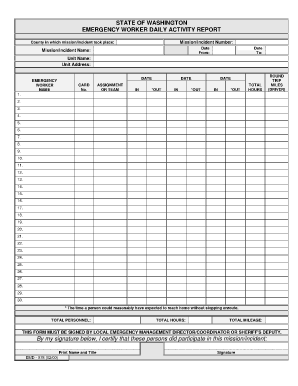
Get State Of Washington Emergency Worker Daily Activity Report
How it works
-

Open form follow the instructions
-

Easily sign the form with your finger
-

Send filled & signed form or save
How to fill out the State Of Washington Emergency Worker Daily Activity Report online
This guide aims to assist users in accurately completing the State Of Washington Emergency Worker Daily Activity Report online. By providing step-by-step instructions for each section of the form, users can ensure proper documentation of their emergency work activities.
Follow the steps to complete the report successfully.
- Click ‘Get Form’ button to obtain the report and open it in the online editor.
- Fill in the mission or incident number at the top of the form. This identifier is crucial for tracking the specific mission you are reporting on.
- Next, enter the county where the mission or incident took place. This ensures that the report is filed under the correct jurisdiction.
- Input the date range of the mission or incident by specifying the start date in the 'From' field and the end date in the 'To' field.
- Provide the mission or incident name, which helps in identifying the specific event you participated in.
- Enter your unit name and unit address. These details are important for associating the activity with the correct agency or organization.
- Fill in the emergency worker's name and date card number. This personal information confirms the identity of the individual performing the work.
- Indicate the assignment or team on which you were working during the incident. This specifies your role and responsibilities.
- For each reporting day, record the date in the 'IN' and 'OUT' fields, indicating the times you were on duty.
- Document the total hours worked each day in the 'TOTAL HOURS' field, summing the hours for accuracy.
- If applicable, calculate and fill in the round trip miles driven as a driver in the designated field.
- In the sequential order, repeat steps 9 to 11 for each day that you were engaged in the emergency response activities, up to 30 entries.
- At the end of the report, summarize the total personnel that participated in the mission by entering the number in the 'TOTAL PERSONNEL' field.
- Calculate the total hours worked from all entries and enter it into the 'TOTAL HOURS' field.
- Sum the total mileage driven and input this number in the 'TOTAL MILEAGE' field.
- Ensure you have the form signed by the local emergency management director or coordinator or a sheriff's deputy. Their signature validates the report.
- Lastly, print or save the completed report for your records and to submit, depending on the requirements set forth by your agency.
Complete your State Of Washington Emergency Worker Daily Activity Report online today to ensure accurate reporting of your emergency work!
General types of SAR missions include: Mountain Rescue, Ground search and rescue (in wilderness areas), air sea rescue and avalanche rescue.
Industry-leading security and compliance
US Legal Forms protects your data by complying with industry-specific security standards.
-
In businnes since 199725+ years providing professional legal documents.
-
Accredited businessGuarantees that a business meets BBB accreditation standards in the US and Canada.
-
Secured by BraintreeValidated Level 1 PCI DSS compliant payment gateway that accepts most major credit and debit card brands from across the globe.