Loading
Form preview
  • US Legal Forms
  • Form Library
  • More Forms
  • More Uncategorized Forms
  • Garth Road Parking

Get Garth Road Parking

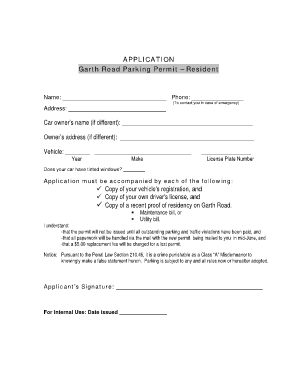
For Internal Use: Date issued.

How it works

  1. Open form

    Open form follow the instructions

  2. Easily sign form

    Easily sign the form with your finger

  3. Share form

    Send filled & signed form or save

How to fill out the Garth Road Parking online

This guide provides clear and detailed instructions on how to complete the Garth Road Parking Permit application online. Follow these steps to ensure a seamless and efficient process.

Follow the steps to successfully complete your application.

  1. Press the ‘Get Form’ button to acquire the application form for the Garth Road Parking Permit and open it in your preferred digital editor.
  2. Begin by filling in your name and phone number at the top of the form. Ensure the phone number is one that can be used to contact you in case of an emergency.
  3. Next, provide your residential address where you currently reside on Garth Road.
  4. If the car owner is different from you, fill out the car owner's name and address in the designated fields.
  5. In the vehicle section, indicate the year, make, and model of your vehicle, followed by the license plate number.
  6. Indicate whether your vehicle has tinted windows by responding to the relevant question on the form.
  7. Ensure that you gather the required documents to accompany your application, including a copy of your vehicle's registration, a copy of your driver’s license, and a recent proof of residency. This proof can be either a maintenance bill or a utility bill.
  8. Acknowledge and understand the conditions stated in the form regarding outstanding parking and traffic violations, the handling of paperwork via mail, and the $5.00 replacement fee for a lost permit.
  9. Sign the application to validate your submission, ensuring that all information is accurate and true.
  10. Finally, save your changes, download the completed form, and print it. You can also share it as needed.

Start filling out your Garth Road Parking application online today to obtain your permit!

Get form

Experience a faster way to fill out and sign forms on the web. Access the most extensive library of templates available.
Get form

Related content

Section 1662-B Residential parking system in the...
Such residential parking permit system may only be established: (a) within the area of the...
Learn more
Garth Brooks at Notre Dame - Game Day
BULLA RD. COURTNEY LANE noitc urtsno. C redn. U t. oL. Construction. Student. Parking...
Learn more
Rochester, New York - Wikipedia
Rochester is a city in the U.S. state of New York, the seat of Monroe County and the...
Learn more

Related links form

Instructional Technology Reservation Form Florida A&M University - Famu Request For Relocation Of Property - Florida Agricultural & Mechanical ... School Of Journalism Studies And Employer Satisfaction Survey Form By FDOE - Florida A&M University

Questions & Answers

Get answers to your most pressing questions about US Legal Forms API.

Contact support

Sketch versions 56 to 71 - choose the Personal License tab, type in your License Key number into the pop-up, and select Register. Alternatively, you can launch the Mac app and link it to your license by selecting Sketch > Preferences > Account > Register from the menu bar and inserting your license key.

On your Anima plugin in Sketch, click “Preview in browser”. Click Export Code in the top right corner. Select where the Code Package will be saved on your computer and click Save.

Please use the following steps to move your license to another device: Unregister your license on your old device: Launch the Mac app, head to Sketch> Preferences from the menu bar, navigate to the Account tab, and select Unlink Device. ... Go to our release page and download your preferred version onto your new device.

When you sign in, we'll ask you to enter your email and password. You'll then need to open your preferred 2FA app and enter a code into Sketch to complete the sign-in process.

On the bottom of the left sidebar, click on Settings > Billing to open the Billing page. Next to the Current Plan click on the Edit... button where you will be able to change to a yearly billing plan.

Sketch versions 56 to 71 - choose the Personal License tab, type in your License Key number into the pop-up, and select Register. Alternatively, you can launch the Mac app and link it to your license by selecting Sketch > Preferences > Account > Register from the menu bar and inserting your license key.

We are the Dutch company, Sketch B.V. (“we” or “us”), with a place of business at Flight Forum 40, Ground floor, 5657 DB Eindhoven, the Netherlands, with a chamber of commerce registration number 60360461 and VAT number NL8538.

Get This Form Now!

Use professional pre-built templates to fill in and sign documents online faster. Get access to thousands of forms.
Get form
If you believe that this page should be taken down, please follow our DMCA take down processhere.

Industry-leading security and compliance

US Legal Forms protects your data by complying with industry-specific security standards.
  • In businnes since 1997
    25+ years providing professional legal documents.
  • Accredited business
    Guarantees that a business meets BBB accreditation standards in the US and Canada.
  • Secured by Braintree
    Validated Level 1 PCI DSS compliant payment gateway that accepts most major credit and debit card brands from across the globe.
Get Garth Road Parking
Get form
  • Adoption
  • Bankruptcy
  • Contractors
  • Divorce
  • Home Sales
  • Employment
  • Identity Theft
  • Incorporation
  • Landlord Tenant
  • Living Trust
  • Name Change
  • Personal Planning
  • Small Business
  • Wills & Estates
  • Packages A-Z
  • Affidavits
  • Bankruptcy
  • Bill of Sale
  • Corporate - LLC
  • Divorce
  • Employment
  • Identity Theft
  • Internet Technology
  • Landlord Tenant
  • Living Wills
  • Name Change
  • Power of Attorney
  • Real Estate
  • Small Estates
  • Wills
  • All Forms
  • Forms A-Z
  • Form Library
  • Legal Hub
  • About Us
  • Help Portal
  • Legal Resources
  • Blog
  • Affiliates
  • Contact Us
  • Delete My Account
  • Site Map
  • Industries
  • Forms in Spanish
  • Localized Forms
  • State-specific Forms
  • Forms Kit
  • Real Estate Handbook
  • All Guides
  • Notarize
  • Incorporation services
  • For Consumers
  • For Small Business
  • For Attorneys
  • USLegal
  • FormsPass
  • pdfFiller
  • signNow
  • altaFlow
  • DocHub
  • Instapage
Form Packages
  • Adoption
  • Bankruptcy
  • Contractors
  • Divorce
  • Home Sales
  • Employment
  • Identity Theft
  • Incorporation
  • Landlord Tenant
  • Living Trust
  • Name Change
  • Personal Planning
  • Small Business
  • Wills & Estates
  • Packages A-Z
Form Categories
  • Affidavits
  • Bankruptcy
  • Bill of Sale
  • Corporate - LLC
  • Divorce
  • Employment
  • Identity Theft
  • Internet Technology
  • Landlord Tenant
  • Living Wills
  • Name Change
  • Power of Attorney
  • Real Estate
  • Small Estates
  • Wills
  • All Forms
  • Forms A-Z
  • Form Library
Customer Service
  • Legal Hub
  • About Us
  • Help Portal
  • Legal Resources
  • Blog
  • Affiliates
  • Contact Us
  • Delete My Account
  • Site Map
  • Industries
  • Forms in Spanish
  • Localized Forms
  • State-specific Forms
  • Forms Kit
Legal Guides
  • Real Estate Handbook
  • All Guides
Prepared for you
  • Notarize
  • Incorporation services
Our Customers
  • For Consumers
  • For Small Business
  • For Attorneys
Our Sites
  • USLegal
  • FormsPass
  • pdfFiller
  • signNow
  • altaFlow
  • DocHub
  • Instapage
Social Media
Call us now toll free:
+1 833 426 79 33
As seen in:
© Copyright 1999-2026 airSlate Legal Forms, Inc. 3720 Flowood Dr, Flowood, Mississippi 39232
  • Your Privacy Choices
  • Terms of Service
  • Privacy Notice
  • Content Takedown Policy
  • Bug Bounty Program