Loading
Get K Cns 100
How it works
-

Open form follow the instructions
-

Easily sign the form with your finger
-

Send filled & signed form or save
How to fill out the K Cns 100 online
Filling out the K Cns 100 form online can be a straightforward process when you understand each section and requirement. This guide provides clear, step-by-step instructions to help you complete the form correctly.
Follow the steps to effectively complete the K Cns 100 online.
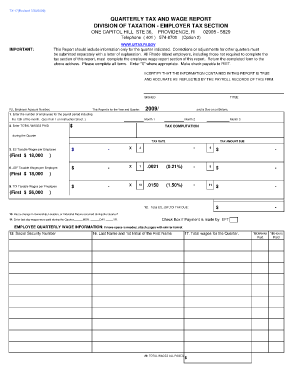
- Click the ‘Get Form’ button to access the K Cns 100 form and open it for editing.
- Indicate the year and quarter for which you are filing the report. Ensure that this information reflects the period you are reporting on.
- Enter the number of employees who were active during the payroll period that includes the 12th of the month. If there were no employees, please enter '0'.
- Document the total wages paid during the quarter, which can include various forms of compensation beyond cash wages.
- Calculate the Employment Security taxable wages per employee, applying the correct rates to the specified wage base.
- Repeat the wage calculations for Job Development Fund and Temporary Disability Insurance, ensuring to follow any stated thresholds.
- Complete the sections regarding any changes in ownership, location, or business nature, along with the last date wages were paid.
- Fill out the wage information for each employee, including Social Security numbers, names, total wages, number of weeks and hours paid.
- Ensure all information is accurate and sign the form as a responsible party from your firm.
- After confirmation of all entries, save your changes, download, print or share the completed form as necessary.
Now that you have these instructions, start completing your K Cns 100 form online with confidence!
An employer with 50 or more employees or third-party administrators with more than 50 client employees are required to electronically file all Quarterly Wage Report and Unemployment Tax Returns and make any payments online.