Loading
Get Wv Dmv-34-tr 2021-2026
How it works
-

Open form follow the instructions
-

Easily sign the form with your finger
-

Send filled & signed form or save
How to fill out the WV DMV-34-TR online
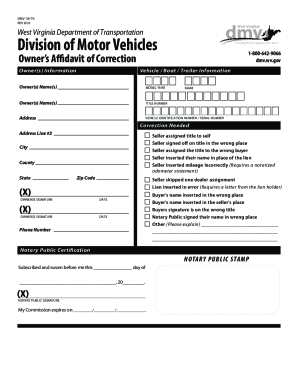
The WV DMV-34-TR is an important document for correcting errors on a vehicle, boat, or trailer title in West Virginia. This guide will walk you through the online process of filling out this form, ensuring that you understand each section clearly.
Follow the steps to complete the WV DMV-34-TR effectively.
- Click ‘Get Form’ button to access the document and open it in the editor.
- Begin filling out the vehicle, boat, or trailer information. This includes the model year, make, and vehicle identification number or serial number. Ensure that you provide accurate details to avoid delays in processing.
- In the owner’s information section, enter the name(s) of the owner(s) exactly as they appear on the original title. Include the address, city, county, state, and zip code.
- Indicate the correction needed by checking the appropriate boxes. If there are specific issues not covered by the options provided, you can describe them in the 'Other' section.
- Each owner must sign in the designated signature field, along with the date of the correction. Make sure that each signature is legible.
- If the form requires notarization, ensure that a notary public completes their section. This includes providing their signature and stamp, and recording their commission expiration date.
- Once you have completed all sections, review the form for accuracy. After confirming that all information is correct, you can save your changes, download, print, or share the completed form as needed.
Complete your documents online with confidence and accuracy.
Fees required to title a new vehicle include a $15 title fee, 6% titling sales tax on vehicles with a net purchase price over $500 or $30 on vehicles with a net purchase price under $500, $10 lien fee (if applicable), and the registration fee and/or registration transfer fee.