Loading
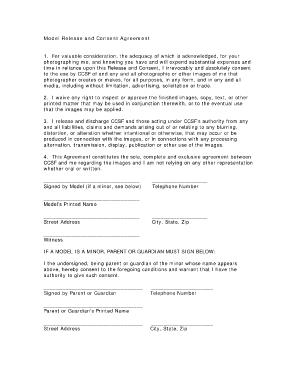
Get Shutterpoint Model Release Form
How it works
-

Open form follow the instructions
-

Easily sign the form with your finger
-

Send filled & signed form or save
How to fill out the Shutterpoint Model Release Form online
Filling out the Shutterpoint Model Release Form online is a straightforward process that helps ensure clarity and consent regarding the use of your photographic images. This guide will take you through each section of the form, providing detailed instructions to help you complete it accurately and confidently.
Follow the steps to fill out the form seamlessly
- Click the ‘Get Form’ button to access the form and open it in your preferred digital editor.
- In the first section, provide your signature to indicate your consent. If you are completing this for a minor, ensure that the parent or guardian signs as well.
- Enter your telephone number in the designated field. This information may be required for verification purposes.
- Fill in your printed name as it should appear officially. This helps in identifying you as the model in relation to the agreement.
- Complete your address, including the street address, city, state, and zip code. This information is crucial for record-keeping and any potential follow-up.
- If applicable, have a witness sign the form in the appropriate section dedicated for this purpose. A witness may be required to validate the agreement.
- If you are a parent or guardian signing for a minor, complete the additional section with your signature, printed name, address, and telephone number. Ensure the minor’s name is clearly stated above.
- Once all required fields are filled out correctly, review the form for accuracy. You can save your changes, download, print, or share the completed form as needed.
Complete your Shutterpoint Model Release Form online today for a smooth and efficient documentation process.
You can always have a contract without a model release, but you should never operate by having a model release without a contract.