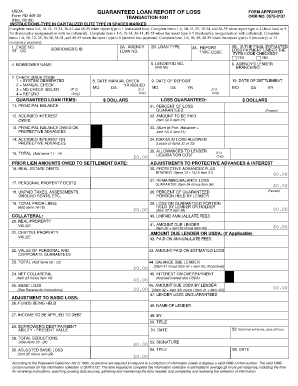
USDA FORM APPROVED GUARANTEED LOAN REPORT OF LOSS Form RD 449-30 OMB NO. 0575-0137 TRANSACTION 4041 Rev. 08-09 INSTRUCTIONS-TYPE IN CAPITALIZED ELITE TYPE IN SPACES MARKED Complete items 1-6 10-12 15-34 36-41 and 48-55 when report type is 1 estimated loss.
Open form follow the instructions
Easily sign the form with your finger
Send filled & signed form or save
How to fill out the USDA Form RD 449-30 online
This guide provides clear and comprehensive instructions for completing the USDA Form RD 449-30 online. Whether you are new to digital forms or have previous experience, you will find the step-by-step process easy to follow.
Follow the steps to complete the form efficiently.
- Click the ‘Get Form’ button to access the form and open it in the online editor.
- Begin by filling out sections 1 through 6, which include your case number, borrower ID, loan number, and borrower name. Ensure that the information is accurate and complete.
- Complete the relevant report type fields based on the situation. For example, if reporting an estimated loss, fill items 10 to 12 and 15 to 34.
- Proceed to the guaranteed loan items section. Enter financial figures such as the principal balance, accrued interest, and total amounts owed as applicable to your case.
- In the collateral section, document the values of any real property, chattel property, and any guarantees. Calculate the total collateral as well as the net collateral.
- Finally, review all entries for accuracy. Once satisfied, you can then save your changes, download the completed form, print it, or share it as needed.
Start completing your USDA Form RD 449-30 online today for a streamlined process.
Experience a faster way to fill out and sign forms on the web. Access the most extensive library of templates available.
Related content
Items 1 - 6 — Form RD 449-30. (Rev. 12-99). GUARANTEED LOAN REPORT OF LOSS. FORM...
(a) Report of loss form. Form RD 449-30, “Loan Note Guarantee Report of Loss,” will be...
Jun 10, 2015 — 26-30, 1988: U.S. Geological Survey Water-Resources Investigations...
Get answers to your most pressing questions about US Legal Forms API.
How do I reduce the size of a document?
Follow these easy steps to compress a large PDF file online: Click the Select a file button above, or drag and drop files into the drop zone. Select the PDF file you want to make smaller. After uploading, Acrobat will automatically reduce the PDF size. Sign in to download or share your compressed PDF.
How do I compress a PDF to 5 MB?
How to Compress a PDF to a Chosen Size Go to the "Compress PDF" online tool. Drag and drop your PDF into the tool. Choose either “Basic compression” or “Strong compression.” Click “Compress,” and you're done. Download your PDF.
How do I convert a PDF to 100kb?
How to Reduce PDF File Size Below 100 KB for Free Go to the Compress PDF tool. Drag and drop your PDF in. Choose the compression type and click “Compress.” Wait for the PDF compression tool to shrink the file. Download your teeny-tiny PDF.
How do I make a PDF smaller to upload?
Reduce File Size of PDF File in Acrobat Pro With Acrobat Pro open, go to File > Open. After your file is open, Go to File > Save as Other > Reduced Size PDF.... Select the Acrobat version that is compatible with the features in your PDF file. ... Re-name your file and Click Save.
How do I resize an image?
How to resize photos with the online image resizer tool. Select. Select your JPG or PNG image and upload it to our photo resizer tool. Choose the size. To resize your image, select a preset social media template or add your own custom size. Download resized image.
What do I do if my PDF is too big to upload?
My documents are too large to upload. How do I reduce the file size? Save as a PDF again, but select the “lowest file size” option available in the software you're using to create the PDF. ... Reduce the image size if you have access to photo-editing software. ... Remove all unnecessary images in your file.
How do I make a PDF file smaller so I can upload it?
How to make a PDF file size smaller. Visit Acrobat online services and navigate to the Compress page by clicking Compress in the menu. Click or tap on the “Select a file” button. Choose the file from your device or from a cloud service like Google Drive. ... Your file will upload and compress.
How to increase PDF size?
You can magnify or reduce a PDF by an exact percentage. Choose File > Print. From the Page Scaling pop-up menu, select Tile All Pages to expose the Tile Scale % option. ... For Tile Scale, type the percentage you want to magnify or reduce the PDF. ... Click OK or Print.
Use professional pre-built templates to fill in and sign documents online faster. Get access to thousands of forms.
If you believe that this page should be taken down, please follow our DMCA take down process here.