Loading
Get Cqv
How it works
-

Open form follow the instructions
-

Easily sign the form with your finger
-

Send filled & signed form or save
How to fill out the Cqv online
Filling out the Cqv form online can be a straightforward process if you follow the right steps. This guide will provide you with detailed instructions to help you accurately complete the form and ensure it meets all necessary requirements.
Follow the steps to successfully complete the Cqv online form.
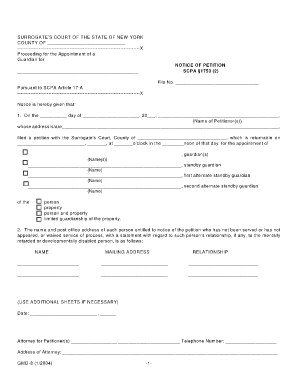
- Press the ‘Get Form’ button to access the Cqv form and open it in your online editor.
- Provide the date in the designated field for when the petition is being filed.
- Enter the name of the petitioner or petitioners in the appropriate section, ensuring correct spelling.
- Fill in the complete mailing address of the petitioner(s) in the designated area.
- Indicate the court's name and county where the petition is being filed.
- Specify the return date of the petition along with the time and whether it is in the morning or afternoon.
- List the name(s) of the proposed guardian(s) or standby guardian(s) as applicable in the specified sections.
- Indicate the type of guardianship being requested: person, property, a combination, or limited guardianship.
- Complete the section detailing the names, mailing addresses, and relationships of individuals entitled to notice if they have not been served.
- Review all entered information for any errors or omissions to ensure accuracy.
- Once you have completed the form, you can save your changes, download the file, print it, or share it as needed.
Begin the process of filling out your Cqv document online today!
The CQV Engineer develops the documentation to support Commissioning, Qualifications, and Validation. These people are responsible for protocol writing and execution, field verification, and development of summary reports at the client site.
Industry-leading security and compliance
US Legal Forms protects your data by complying with industry-specific security standards.
-
In businnes since 199725+ years providing professional legal documents.
-
Accredited businessGuarantees that a business meets BBB accreditation standards in the US and Canada.
-
Secured by BraintreeValidated Level 1 PCI DSS compliant payment gateway that accepts most major credit and debit card brands from across the globe.