Loading
Form preview
  • US Legal Forms
  • Other Templates
  • More Forms
  • More Uncategorized Forms
  • Sruedu Transcript Request Form

Get Sruedu Transcript Request Form

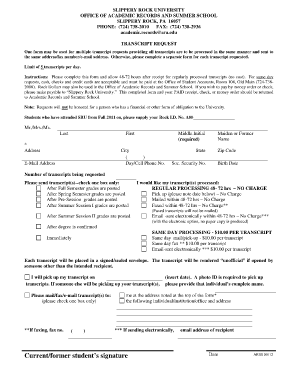
One form may be used for multiple transcript requests providing all transcripts are to ... Otherwise, please complete a separate form for each transcript requested.

How it works

  1. Open form

    Open form follow the instructions

  2. Easily sign form

    Easily sign the form with your finger

  3. Share form

    Send filled & signed form or save

How to fill out the Sruedu Transcript Request Form online

Filling out the Sruedu Transcript Request Form online is a straightforward process that requires attention to detail. This guide provides step-by-step instructions to ensure that you complete the form accurately and efficiently.

Follow the steps to complete your transcript request successfully

  1. Click ‘Get Form’ button to obtain the form and open it in the editor.
  2. Begin by filling in your personal information. Include your last name, first name, and middle initial. Make sure to provide your complete address, including city, state, and zip code, for secure processing.
  3. Enter your contact information, which includes your day or cell phone number and email address. This information will be used for any follow-up questions or confirmations regarding your request.
  4. Indicate your Social Security number and any maiden or former names, if applicable. This can help in verifying your identity when processing the transcripts.
  5. Specify the number of transcripts you are requesting, noting that you can request a maximum of five transcripts per day.
  6. Select the appropriate check box for sending your transcripts. Options include waiting for semester grades or requesting immediate processing, with the corresponding fees if applicable.
  7. If you choose regular processing, note that it usually takes 48-72 hours. Indicate how you would like to receive your transcript—options include pick up, mail, fax, or electronic email.
  8. If someone else will pick up your transcript, provide their complete name and ensure that you write the date on which they will collect it. A photo ID will be required for pickup.
  9. Sign and date the form at the bottom, confirming that the information provided is accurate and that you authorize the processing of your request.
  10. After completing the form, ensure all information is correct, save your changes, and either download, print, or share the form as needed.

Complete your Sruedu Transcript Request Form online today for a smooth and efficient transcript processing experience.

Get form

Experience a faster way to fill out and sign forms on the web. Access the most extensive library of templates available.
Get form

Related content

***********X**********************************X...
public release data files containing transcript and other data. ... form of postsecondary...
Learn more
Request a Transcript / Duplicate Diploma |...
Current SRU Students · If you are an SRU student ordering transcripts by logging into...
Learn more
Pennsylvania State University - Wikipedia
The Pennsylvania State University (Penn State or PSU) is a state-related public land-grant...
Learn more

Related links form

(Unit I) Submit Application And All Documents To: Tuition ... CR-223: CR-223 Summary - Wisconsin Court System SEGUG Papers Are Distributed Freely As A Courtesy Of Paper QuickBooks Fundamentals - The Sleeter Group

Questions & Answers

Get answers to your most pressing questions about US Legal Forms API.

Contact support

A. Transcripts are generated by the education board of conduct, which can be received from the academic institute where you have pursued your education. These may either be procured by visiting the institution physically or by contacting the authorities and requesting them to send them via post.

You may order a tax return transcript and/or a tax account transcript using Get Transcript by Mail or call 800-908-9946. Please allow 5 to 10 calendar days for delivery. You may also submit Form 4506-T.

You may register to use Get Transcript Online to view, print, or download all transcript types listed below. If you're unable to register, or you prefer not to use Get Transcript Online, you may order a tax return transcript and/or a tax account transcript through Get Transcript by Mail or by calling 800-908-9946.

You can also request a transcript by mail by calling our automated phone transcript service at 800-908-9946. Visit our Get Transcript frequently asked questions (FAQs) for more information. If you're trying to get a transcript to complete FAFSA, refer to tax Information for student financial aid applications.

Official college transcripts from each institution attended (can be sent electronically to transferadmissions@sru.edu or through the mail to the Office of Undergraduate Admissions)

0:00 0:52 How to Download an Official Transcript - YouTube YouTube Start of suggested clip End of suggested clip And you'll get to a page with a link that says download your transcript. And this is your officialMoreAnd you'll get to a page with a link that says download your transcript. And this is your official internachi transcript for all of your education.

Current students may order transcripts online through OASIS under "Record Ordering Services". Alumni may order transcripts online.

HOW TO DOWNLOAD YOUR IRS TAX TRANSCRIPT. Step 1 – Go to .IRS.gov and click on Get Transcript of Your Tax Records. Step 2 – Click on Get Transcript ONLINE. Step 3 – Click OK. ... account previously, you can sign in using that information) Enter your information and click on SEND EMAIL CONFIRMATION CODE.

Get This Form Now!

Use professional pre-built templates to fill in and sign documents online faster. Get access to thousands of forms.
Get form
If you believe that this page should be taken down, please follow our DMCA take down processhere.
Get Sruedu Transcript Request Form
Get form
  • Adoption
  • Bankruptcy
  • Contractors
  • Divorce
  • Home Sales
  • Employment
  • Identity Theft
  • Incorporation
  • Landlord Tenant
  • Living Trust
  • Name Change
  • Personal Planning
  • Small Business
  • Wills & Estates
  • Packages A-Z
  • Affidavits
  • Bankruptcy
  • Bill of Sale
  • Corporate - LLC
  • Divorce
  • Employment
  • Identity Theft
  • Internet Technology
  • Landlord Tenant
  • Living Wills
  • Name Change
  • Power of Attorney
  • Real Estate
  • Small Estates
  • Wills
  • All Forms
  • Forms A-Z
  • Other Templates
  • Legal Hub
  • About Us
  • Help Portal
  • Legal Resources
  • Blog
  • Affiliates
  • Contact Us
  • Delete My Account
  • Site Map
  • Industries
  • Forms in Spanish
  • Localized Forms
  • State-specific Forms
  • Forms Kit
  • Real Estate Handbook
  • All Guides
  • Notarize
  • Incorporation services
  • For Consumers
  • For Small Business
  • For Attorneys
  • USLegal
  • FormsPass
  • pdfFiller
  • signNow
  • altaFlow
  • DocHub
  • Instapage
Form Packages
  • Adoption
  • Bankruptcy
  • Contractors
  • Divorce
  • Home Sales
  • Employment
  • Identity Theft
  • Incorporation
  • Landlord Tenant
  • Living Trust
  • Name Change
  • Personal Planning
  • Small Business
  • Wills & Estates
  • Packages A-Z
Form Categories
  • Affidavits
  • Bankruptcy
  • Bill of Sale
  • Corporate - LLC
  • Divorce
  • Employment
  • Identity Theft
  • Internet Technology
  • Landlord Tenant
  • Living Wills
  • Name Change
  • Power of Attorney
  • Real Estate
  • Small Estates
  • Wills
  • All Forms
  • Forms A-Z
  • Other Templates
Customer Service
  • Legal Hub
  • About Us
  • Help Portal
  • Legal Resources
  • Blog
  • Affiliates
  • Contact Us
  • Delete My Account
  • Site Map
  • Industries
  • Forms in Spanish
  • Localized Forms
  • State-specific Forms
  • Forms Kit
Legal Guides
  • Real Estate Handbook
  • All Guides
Prepared for you
  • Notarize
  • Incorporation services
Our Customers
  • For Consumers
  • For Small Business
  • For Attorneys
Our Sites
  • USLegal
  • FormsPass
  • pdfFiller
  • signNow
  • altaFlow
  • DocHub
  • Instapage
Social Media
Call us now toll free:
+1 833 426 79 33
As seen in:
© Copyright 1999-2026 airSlate Legal Forms, Inc. 17 Station Street, Ste. 203, Brookline, MA 02445
  • Your Privacy Choices
  • Terms of Service
  • Privacy Notice
  • Content Takedown Policy
  • Bug Bounty Program