We use cookies to improve security, personalize the user experience, enhance our marketing activities (including cooperating with our marketing partners) and for other business use.
Click "here" to read our Cookie Policy. By clicking "Accept" you agree to the use of cookies. Read less
Read more
Accept
Loading
Form preview
  • US Legal Forms
  • Form Library
  • More Forms
  • More Uncategorized Forms
  • Form 990 -ez 2010 - Donate Perlfoundation

Get Form 990 -ez 2010 - Donate Perlfoundation

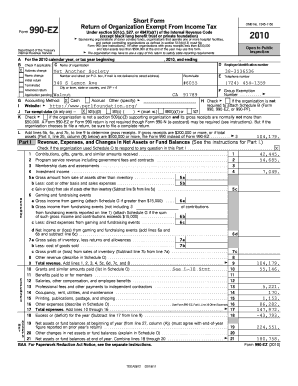
FormShort Form Return of Organization Exempt From Income Tax990EZ GDepartment of the Treasury Internal Revenue ServiceA BXUnder section 501(c), 527, or 4947(a)(1) of the Internal Revenue Code (except.

How it works

  1. Open form

    Open form follow the instructions

  2. Easily sign form

    Easily sign the form with your finger

  3. Share form

    Send filled & signed form or save

How to fill out the Form 990 -EZ 2010 - Donate Perlfoundation online

Filing the Form 990-EZ is an essential task for organizations seeking to maintain their tax-exempt status while providing transparency in their operations. This guide offers clear and practical steps to assist users in completing the Form 990-EZ for the year 2010, specifically in relation to the Perlfoundation.

Follow the steps to successfully complete your Form 990-EZ online.

  1. Click ‘Get Form’ button to obtain the form and open it in the editor.
  2. In section A, enter the organization’s name, address, and employer identification number (EIN). Make sure to double-check these details for accuracy.
  3. In section B, indicate the type of return you are filing by checking the appropriate box, such as 'Initial return' or 'Amended return'.
  4. For section C, indicate the tax-exempt status of the organization by checking the relevant box for 501(c)(3), 501(c)(4), or others as applicable.
  5. In Part I, provide a summary of the organization’s revenue, expenses, and changes in net assets. Fill out the lines corresponding to contributions, program service revenue, and total revenue carefully.
  6. Continue to fields that detail specific revenues and expenses, ensuring to complete each line with accurate figures from the organization’s financial records.
  7. In Part II, detail the balance sheet information including total assets and liabilities. This section should align with your organization's financial statements.
  8. Proceed to Part III, where you describe the organization's program service accomplishments. Provide detailed descriptions of the services offered and the impact achieved.
  9. List the officers, directors, and key employees in Part IV, providing their names, titles, and compensation details.
  10. Complete Part V by answering any additional questions specific to the organization’s activities, such as engagement in lobbying or political campaign activities.
  11. After thoroughly reviewing the form for accuracy and completeness, save your changes within the editor. You can then download, print, or share the completed form as required.

Start filling out your Form 990-EZ online today to ensure your organization remains compliant and transparent.

Get form

Experience a faster way to fill out and sign forms on the web. Access the most extensive library of templates available.
Get form

Related content

Sheet1 - Internal Revenue Service
100, 453047818, NAPLES AUTO DONATION CENTER INC, % JENNIFER ... 1, 17, 0, 1, 59, 0...
Learn more

Related links form

PA PA-8879P 2023 Transcript Of Records - EN Law Faculty Sevis I 20 Form Application - Fill Online, Printable ... Lassen Community College ADMISSIONS & RECORDS

Questions & Answers

Get answers to your most pressing questions about US Legal Forms API.

Contact support

Invoice Naming Conventions. The name of your invoice (that is, the subject name and/or the file name) should be a summary of the invoice details that make finding the invoice as simple as possible. Keep in mind that the invoice name may be different than the subject of the invoice.

If a business makes a mistake on an invoice they have already sent to their customer, they must cancel the invoice with a credit note and then issue a new invoice. The credit note essentially 'pays' the incorrect invoice so there is no outstanding payment.

§ 301.25 Name required to appear on labels and invoices. The name required by the act to be used on labels and invoices shall be the full name under which the person is doing business, and no trade-mark, trade name nor other name which does not constitute such full name shall be used in lieu thereof.

In general, it is possible to amend an invoice in situations where a business made an error or the invoice is missing certain information. Invoices that have not been sent to a client should simply be amended and reviewed again before being sent.

In and of itself, an invoice is not a legally binding agreement. If an invoice on its own was a legally binding document, then vendors could create bogus invoices and then force their clients to pay them. If both sides do not agree to the invoice, then it is not legally binding.

You pay them as a client, and you use them to collect payments from customers. Sales invoices include details like the client's name, your company name, and your phone number. They also include informative details like the date of the invoice, payment due date, your bank account details, and the total amount due.

A tax invoice is supposed to show the person to whom the goods or services are supplied. So, if an invoice is not in the name of the business, it usually means that the supply was not made to it.

If an incorrect invoice has been sent, the business must issue a cancellation invoice with its own, new invoice number. This will include a negative invoice amount, as well as the original invoice number and the date it was issued. Then, a correct invoice can be raised with a different invoice number.

As long as you are the only owner, your business starts when your business activities start. You are therefore free to invoice clients as necessary. Once you provide a good and service in exchange for a fee, you can consider yourself a sole proprietor, a business owner, and can create a personal invoice.

It's not legal to change an agreed upon invoice unless it's to correct a mistake.

Get This Form Now!

Use professional pre-built templates to fill in and sign documents online faster. Get access to thousands of forms.
Get form
If you believe that this page should be taken down, please follow our DMCA take down processhere.

Industry-leading security and compliance

US Legal Forms protects your data by complying with industry-specific security standards.
  • In businnes since 1997
    25+ years providing professional legal documents.
  • Accredited business
    Guarantees that a business meets BBB accreditation standards in the US and Canada.
  • Secured by Braintree
    Validated Level 1 PCI DSS compliant payment gateway that accepts most major credit and debit card brands from across the globe.
Get Form 990 -EZ 2010 - Donate Perlfoundation
Get form
Form Packages
Adoption
Bankruptcy
Contractors
Divorce
Home Sales
Employment
Identity Theft
Incorporation
Landlord Tenant
Living Trust
Name Change
Personal Planning
Small Business
Wills & Estates
Packages A-Z
Form Categories
Affidavits
Bankruptcy
Bill of Sale
Corporate - LLC
Divorce
Employment
Identity Theft
Internet Technology
Landlord Tenant
Living Wills
Name Change
Power of Attorney
Real Estate
Small Estates
Wills
All Forms
Forms A-Z
Form Library
Customer Service
Terms of Service
Privacy Notice
Legal Hub
Content Takedown Policy
Bug Bounty Program
About Us
Help Portal
Legal Resources
Blog
Affiliates
Contact Us
Delete My Account
Site Map
Industries
Forms in Spanish
Localized Forms
State-specific Forms
Forms Kit
Legal Guides
Real Estate Handbook
All Guides
Prepared for You
Notarize
Incorporation services
Our Customers
For Consumers
For Small Business
For Attorneys
Our Sites
US Legal Forms
USLegal
FormsPass
pdfFiller
signNow
airSlate WorkFlow
DocHub
Instapage
Social Media
Call us now toll free:
+1 833 426 79 33
As seen in:
  • USA Today logo picture
  • CBC News logo picture
  • LA Times logo picture
  • The Washington Post logo picture
  • AP logo picture
  • Forbes logo picture
© Copyright 1997-2025
airSlate Legal Forms, Inc.
3720 Flowood Dr, Flowood, Mississippi 39232
Form Packages
Adoption
Bankruptcy
Contractors
Divorce
Home Sales
Employment
Identity Theft
Incorporation
Landlord Tenant
Living Trust
Name Change
Personal Planning
Small Business
Wills & Estates
Packages A-Z
Form Categories
Affidavits
Bankruptcy
Bill of Sale
Corporate - LLC
Divorce
Employment
Identity Theft
Internet Technology
Landlord Tenant
Living Wills
Name Change
Power of Attorney
Real Estate
Small Estates
Wills
All Forms
Forms A-Z
Form Library
Customer Service
Terms of Service
Privacy Notice
Legal Hub
Content Takedown Policy
Bug Bounty Program
About Us
Help Portal
Legal Resources
Blog
Affiliates
Contact Us
Delete My Account
Site Map
Industries
Forms in Spanish
Localized Forms
State-specific Forms
Forms Kit
Legal Guides
Real Estate Handbook
All Guides
Prepared for You
Notarize
Incorporation services
Our Customers
For Consumers
For Small Business
For Attorneys
Our Sites
US Legal Forms
USLegal
FormsPass
pdfFiller
signNow
airSlate WorkFlow
DocHub
Instapage
Social Media
Call us now toll free:
+1 833 426 79 33
As seen in:
  • USA Today logo picture
  • CBC News logo picture
  • LA Times logo picture
  • The Washington Post logo picture
  • AP logo picture
  • Forbes logo picture
© Copyright 1997-2025
airSlate Legal Forms, Inc.
3720 Flowood Dr, Flowood, Mississippi 39232