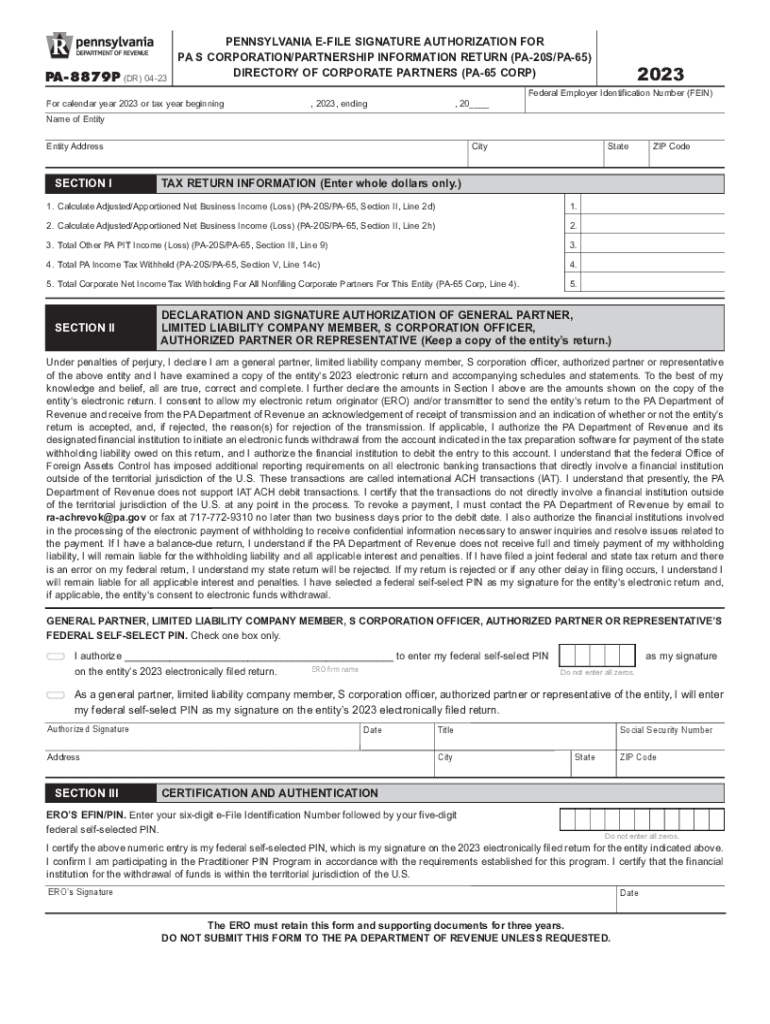
PA8879P (DR) 0622PENNSYLVANIAEFILE SIGNATURE AUTHORIZATION FOR PA S CORPORATION/PARTNERSHIP INFORMATION RETURN (PA20S/PA65) DIRECTORY OF CORPORATE PARTNERS (PA65 CORP)2022Federal Employer Identification.
Loading

Open form follow the instructions

Easily sign the form with your finger

Send filled & signed form or save
How to fill out the PA PA-8879P online
The PA PA-8879P form is essential for authorizing the electronic filing of Pennsylvania S Corporation and Partnership information returns. This guide provides a step-by-step approach to assist users in completing the form accurately and efficiently online.
Follow the steps to complete the PA PA-8879P form online.
- Click the ‘Get Form’ button to access the PA PA-8879P form and open it in your preferred document editor.
- Fill in the required calendar year and the Federal Employer Identification Number (FEIN) of the entity in the designated fields.
- Provide the entity's name and complete address, including the ZIP code. Ensure all information is accurate.
- In Section I, enter the amounts for Adjusted/Apportioned Net Business Income and other relevant figures using the entity’s tax return as a reference.
- Move to Section II and verify the accuracy of the entity's prepared tax return. Select the appropriate box to authorize the ERO to enter the federal self-selected PIN or choose to enter it yourself.
- Enter the federal self-selected PIN if authorizing the ERO and ensure it is a five-digit number, not all zeros.
- Complete Section II by signing, dating, and entering your title as the general partner, limited liability company member, S corporation officer, or authorized partner.
- Keep a copy of the entity’s tax return for your records and return the completed PA-8879P to the ERO through hand delivery, mail, or appropriate digital methods.
- Ensure the ERO has entered their six-digit e-File Identification Number (EFIN) followed by the five-digit federal self-selected PIN in Section III. The ERO retains this form for three years.
- Once all steps are completed, save your changes, and you may choose to download, print, or share the completed form as needed.
Complete your PA PA-8879P form online today and ensure your electronic filing is submitted accurately.
Experience a faster way to fill out and sign forms on the web. Access the most extensive library of templates available.
Related content
The ERO must retain this form and supporting documents for three years. DO NOT SUBMIT THIS...
Feb 6, 2023 — 2016 Personal Tax Forms · Instructions for PA-40 Personal Income Tax...
Under penalties of perjury, I declare that I have examined a copy of my electronic...
Get answers to your most pressing questions about US Legal Forms API.
What are the responsibilities of an ERO with the IRS?
An Electronic Return Originator (ERO) begins the process of electronic submission of returns it either prepares or collects from taxpayers who want to e-file their returns. An ERO starts the electronic submission of a return after the taxpayer authorizes the filing of the return via IRS e-file.
What is form 8879 PE used for?
A partner or member or PR and an electronic return originator (ERO) use Form 8879-PE when the partner or member or PR wants to use a personal identification number (PIN) to electronically sign a partnership's electronic return of partnership income or AAR. Form 8879-PE - IRS irs.gov https://.irs.gov › pub › irs-access irs.gov https://.irs.gov › pub › irs-access
What is a form pa 8879?
Form 8879 is the declaration document and signature authorization for an e-filed return filed by an electronic return originator (ERO). About Form 8879, IRS e-file Signature Authorization IRS (.gov) https://.irs.gov › forms-pubs › about-form-8879 IRS (.gov) https://.irs.gov › forms-pubs › about-form-8879
Is Form 1040 and 8879 the same?
What's New. Form 8879 is used to authorize the electronic filing (e-file) of original and amended returns. Use this Form 8879 (Rev. January 2021) to authorize e-file of your Form 1040, 1040-SR, 1040-NR, 1040-SS, or 1040- X, for tax years beginning with 2019. Form 8879 (Rev. January 2021) - IRS irs.gov https://.irs.gov › pub › irs-pdf irs.gov https://.irs.gov › pub › irs-pdf
When must an ERO obtain and retain completed form 8879 PE?
The ERO must retain Forms 8879 and 8878 for three years from the return due date or the IRS received date, whichever is later. EROs must not send Forms 8879 and 8878 to the IRS unless the IRS requests they do so. Once signed, an ERO must originate the electronic submission of a return as soon as possible. Signing an Electronic Tax Return iastate.edu https://.calt.iastate.edu › signing-electronic-tax-return iastate.edu https://.calt.iastate.edu › signing-electronic-tax-return
How long must ERO keep copies of form 8453?
I will keep form FTB 8453 on file for four years from the due date of the return or four years from the date the return is filed, whichever is later, and I will make a copy available to the FTB upon request.
What is the 3 day rule for 8879?
The form must be signed and dated by the taxpayer—the IRS does not consider verbal, email, or any other form of consent to file to be sufficient. Further, your tax preparer must submit your tax return within three days of receiving the signed Form 8879.
Who keeps form 8879?
Complete Form 8879 when the Practitioner PIN method is used or when the taxpayer authorizes the ERO to enter or generate the taxpayer's personal identification number (PIN) on his or her e-filed individual income tax return. Don't send this form to the IRS. The ERO must retain Form 8879.
Use professional pre-built templates to fill in and sign documents online faster. Get access to thousands of forms.
If you believe that this page should be taken down, please follow our DMCA take down process here.