Loading
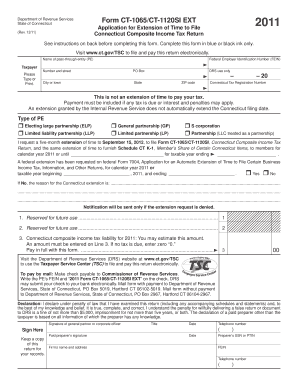
Get Form Ct 1065ct 1120si Ext 2012 Editable
How it works
-

Open form follow the instructions
-

Easily sign the form with your finger
-

Send filled & signed form or save
How to fill out the Form CT-1065/CT-1120SI EXT 2012 Editable online
This guide provides a clear and comprehensive overview of how to fill out the Form CT-1065/CT-1120SI EXT 2012 Editable online. By following these instructions, users can efficiently complete the application for an extension of time to file the Connecticut Composite Income Tax Return.
Follow the steps to accurately complete the form online.
- Click ‘Get Form’ button to obtain the form and open it in the editor.
- Begin by filling out the name of the pass-through entity (PE) in the designated field. Ensure that this information is accurate to avoid issues during processing.
- Enter the Federal Employer Identification Number (FEIN) in the appropriate section. This is crucial for the identification of your entity.
- Provide the taxpayer information, including the number and street address, PO Box if applicable, city or town, state, and ZIP code. This information should be clear and legible.
- Indicate the Connecticut Tax Registration Number. This is necessary for the Connecticut Department of Revenue Services to identify your account.
- Choose the type of pass-through entity by selecting the appropriate checkbox. Options include electing large partnership, limited liability partnership, general partnership, limited partnership, S corporation, and partnership.
- Request the five-month extension by indicating the desired extension date. Ensure this aligns with your business's filing needs.
- If applicable, state whether a federal extension has been requested by checking 'Yes' or 'No'. If 'No', provide the reason for the Connecticut extension request in the space provided.
- Estimate the Connecticut composite income tax liability for the year and enter this amount in Line 3. Remember, if no tax is due, enter '0'.
- Complete the declaration section by signing and dating the form. The form must be signed by a general partner or corporate officer.
- If a paid preparer is involved, they must sign as well and provide their information, including SSN or PTIN and firm’s FEIN.
- Once all sections are completed correctly, save changes to the form. Users can then download, print, or share the form as necessary.
Complete your documents online efficiently today!
Prompted by COVID-19, the Connecticut Department of Revenue Services (DRS) is granting an automatic extension of Connecticut filing deadlines for some Connecticut tax returns due on or after March 15, 2020, and before June 1, 2020.