Loading
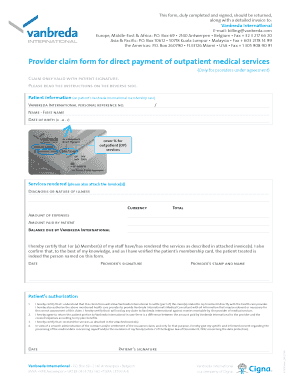
Get Vanbreda International Claim Form
How it works
-

Open form follow the instructions
-

Easily sign the form with your finger
-

Send filled & signed form or save
How to fill out the Vanbreda International Claim Form online
Filling out the Vanbreda International Claim Form online can streamline the process of submitting your claim for outpatient medical services. This guide will provide step-by-step instructions to ensure that you complete the form accurately and effectively.
Follow the steps to successfully complete the claim form.
- Press the ‘Get Form’ button to access the Vanbreda International Claim Form and open it in your preferred online editor.
- Fill in your personal information as it appears on your Vanbreda International membership card. This includes your personal reference number, name, and date of birth.
- Indicate the cover percentage for outpatient services as specified on your membership card.
- Detail the services rendered by attaching the corresponding invoices. Clearly state the diagnosis or nature of the illness and the currency used.
- Specify the total amount of expenses, the amount paid by you, and the balance due to Vanbreda International.
- Sign and date the Certification section to confirm that the services were rendered as described and that the patient is accurately represented.
- Ensure that the health care provider signs the form and affixes their stamp or name where indicated.
- Obtain the patient's authorization signature, certifying their understanding of the claim process and consent for information sharing.
- After completing all sections, you can save your changes, download a copy of the form for your records, and print or share it as needed.
Complete your Vanbreda International Claim Form online today and ensure that your claims are processed efficiently.
noun. : a document with information about why a person should be given money.