Loading
Form preview
  • US Legal Forms
  • Form Library
  • More Forms
  • More Uncategorized Forms
  • W 9 Revised January 2005 Form

Get W 9 Revised January 2005 Form

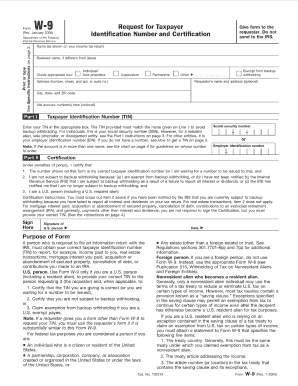
Form (Rev. January 2005) Department of the Treasury Internal Revenue Service W-9 Request for Taxpayer Identification Number and Certification Give form to the requester. Do not send to the IRS. Print.

How it works

  1. Open form

    Open form follow the instructions

  2. Easily sign form

    Easily sign the form with your finger

  3. Share form

    Send filled & signed form or save

How to fill out the W 9 Revised January 2005 Form online

This guide provides a comprehensive overview of how to complete the W 9 Revised January 2005 Form online. Whether you are a newcomer to digital forms or seeking clarification, this step-by-step process will help you navigate the form efficiently.

Follow the steps to successfully fill out the W 9 form online.

  1. Press the ‘Get Form’ button to obtain the W 9 Revised January 2005 Form and open it in your chosen editor.
  2. In the first section, provide your name as shown on your tax return. If you are a business owner, enter the business name under your personal name.
  3. In the next section, indicate your federal tax classification. Choose from options such as individual/sole proprietor, corporation, or partnership.
  4. Next, enter your address, including both street and city/state/ZIP code. This information is important for tax documentation.
  5. Provide your taxpayer identification number (TIN). This may include your Social Security Number (SSN) or Employer Identification Number (EIN). Ensure this information is accurate.
  6. If applicable, enter your account numbers for the financial institution or company that may request this form.
  7. Review the certification section to confirm that the information you provided is correct. You will need to sign and date the form.
  8. Finally, save all changes made to the document, and you can choose to download, print, or share the form as needed.

Complete your documents online and streamline your filing process.

Get form

Experience a faster way to fill out and sign forms on the web. Access the most extensive library of templates available.
Get form

Related content

Form W-9 (Rev. January 2003) - Internal Revenue...
Do not send to the IRS. Form W-9. Request for Taxpayer. Identification Number and...
Learn more
From W-9 (Rev. January 2005)
Give form to the requester. Do not send to the IRS. Form W-9. Request for Taxpayer...
Learn more
2017 General Instructions for Forms W-2 and W-3...
May 2, 2017 — New guidance for completing Forms W-2 for these employees is available at...
Learn more

Related links form

IRS Instructions For Forms 1099-SA And 5498-SA 2022 IRS 720 2023 IRS Instructions 8865 2021 NY IT-203-TM 2022

Questions & Answers

Get answers to your most pressing questions about US Legal Forms API.

Contact support

Commonly, the business or financial institutions will give you a blank W-9, and you can complete it directly. Or if you or your business is asked to provide a fillable w 9 form to independent contractors, you can download the w 9 form directly from the IRS website.

If a business or entity is exempt from backup withholding, they will need to list their code here. Certification: A W-9 form must be signed and dated to be considered complete. Keep in mind that this is a legal document, so all information must be accurate.

Taxation on W-9 income In general, income that results from a W-9 arrangement is not subject to IRS withholding. Rather, it is the payee's responsibility to claim the income on his or her tax return, and to pay any appropriate taxes.

While the form doesn't change that often, it's good practice to request an updated Form W-9 annually, or as you notice a change in vendor information. This process ensures you will have the most up-to-date information. Another tip when receiving W-9 forms is to review them as you receive them.

The W-9 can be downloaded from the IRS website, and the business must then provide a completed W-9 to every employer it works for to verify its EIN for reporting purposes.

After they are completed, your vendors', freelancers' and contractors' W-9 forms do not expire. However, the IRS requires them to be replaced when specific information is changed, including changes in names, type of business entity or a taxpayer ID number.

Penalties could be anywhere from $50 to $270 for every missing form. If you are a contractor, vendor, or payee of a business then failing to fill out a W-9 form may attract IRS penalties.

Form W-9 remains valid indefinitely unless until there is a change in circumstances that makes the required information on the form incorrect or unreliable. The form now requires a payee that is exempt from backup withholding to provide a code that identifies the type of exempt recipient.

Get This Form Now!

Use professional pre-built templates to fill in and sign documents online faster. Get access to thousands of forms.
Get form
If you believe that this page should be taken down, please follow our DMCA take down processhere.

Industry-leading security and compliance

US Legal Forms protects your data by complying with industry-specific security standards.
  • In businnes since 1997
    25+ years providing professional legal documents.
  • Accredited business
    Guarantees that a business meets BBB accreditation standards in the US and Canada.
  • Secured by Braintree
    Validated Level 1 PCI DSS compliant payment gateway that accepts most major credit and debit card brands from across the globe.
Get W 9 Revised January 2005 Form
Get form
  • Adoption
  • Bankruptcy
  • Contractors
  • Divorce
  • Home Sales
  • Employment
  • Identity Theft
  • Incorporation
  • Landlord Tenant
  • Living Trust
  • Name Change
  • Personal Planning
  • Small Business
  • Wills & Estates
  • Packages A-Z
  • Affidavits
  • Bankruptcy
  • Bill of Sale
  • Corporate - LLC
  • Divorce
  • Employment
  • Identity Theft
  • Internet Technology
  • Landlord Tenant
  • Living Wills
  • Name Change
  • Power of Attorney
  • Real Estate
  • Small Estates
  • Wills
  • All Forms
  • Forms A-Z
  • Form Library
  • Legal Hub
  • About Us
  • Help Portal
  • Legal Resources
  • Blog
  • Affiliates
  • Contact Us
  • Delete My Account
  • Site Map
  • Industries
  • Forms in Spanish
  • Localized Forms
  • State-specific Forms
  • Forms Kit
  • Real Estate Handbook
  • All Guides
  • Notarize
  • Incorporation services
  • For Consumers
  • For Small Business
  • For Attorneys
  • USLegal
  • FormsPass
  • pdfFiller
  • signNow
  • altaFlow
  • DocHub
  • Instapage
Form Packages
  • Adoption
  • Bankruptcy
  • Contractors
  • Divorce
  • Home Sales
  • Employment
  • Identity Theft
  • Incorporation
  • Landlord Tenant
  • Living Trust
  • Name Change
  • Personal Planning
  • Small Business
  • Wills & Estates
  • Packages A-Z
Form Categories
  • Affidavits
  • Bankruptcy
  • Bill of Sale
  • Corporate - LLC
  • Divorce
  • Employment
  • Identity Theft
  • Internet Technology
  • Landlord Tenant
  • Living Wills
  • Name Change
  • Power of Attorney
  • Real Estate
  • Small Estates
  • Wills
  • All Forms
  • Forms A-Z
  • Form Library
Customer Service
  • Legal Hub
  • About Us
  • Help Portal
  • Legal Resources
  • Blog
  • Affiliates
  • Contact Us
  • Delete My Account
  • Site Map
  • Industries
  • Forms in Spanish
  • Localized Forms
  • State-specific Forms
  • Forms Kit
Legal Guides
  • Real Estate Handbook
  • All Guides
Prepared for you
  • Notarize
  • Incorporation services
Our Customers
  • For Consumers
  • For Small Business
  • For Attorneys
Our Sites
  • USLegal
  • FormsPass
  • pdfFiller
  • signNow
  • altaFlow
  • DocHub
  • Instapage
Social Media
Call us now toll free:
+1 833 426 79 33
As seen in:
© Copyright 1999-2026 airSlate Legal Forms, Inc. 3720 Flowood Dr, Flowood, Mississippi 39232
  • Your Privacy Choices
  • Terms of Service
  • Privacy Notice
  • Content Takedown Policy
  • Bug Bounty Program