Loading
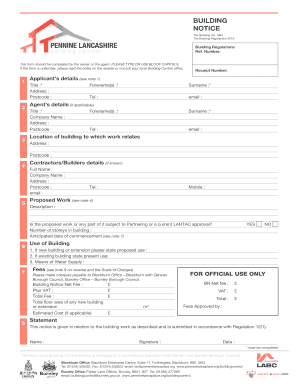
Get Plbc Building Notice 020713 - Penninelancsplace
How it works
-

Open form follow the instructions
-

Easily sign the form with your finger
-

Send filled & signed form or save
How to fill out the PLBC Building Notice 020713 - Penninelancsplace online
This guide provides clear and detailed instructions on completing the PLBC Building Notice 020713 for Penninelancsplace online. Whether you are the owner or an agent, this user-friendly walkthrough will help you navigate each section and field of the form confidently.
Follow the steps to successfully complete your Building Notice submission.
- Click ‘Get Form’ button to obtain the form and open it in your preferred editor.
- Begin with the applicant's details section. Provide your title, address, postcode, forename(s), surname, telephone number, and email address. Ensure all mandatory fields, indicated with an asterisk (*), are completed.
- If applicable, fill out the agent’s details, including their title, company name, address, postcode, forename(s), surname, telephone number, and email address.
- In the location of the building to which the work relates section, enter the building's address and postcode.
- If known, provide the contractors or builders' details, which should include their full name, company name, address, postcode, email, telephone, and mobile number.
- Describe the proposed work in detail. Indicate whether any part of it is subject to Partnering or has a current LANTAC approval. Include the number of storeys in the building and the anticipated date of commencement.
- Specify the use of the building. If it is a new building or an extension, state the proposed use. If the building is existing, state its current use and provide details for the means of water supply.
- Calculate and enter the fees as outlined in the notes. Specify the net fee, plus VAT, and the total fee for the building notice. If applicable, include the total floor area of any new building or extension, as well as the estimated cost.
- Complete the statement section with your name, signature, and the date of submission. Review the form to ensure all information is accurate and complete.
- Once you have filled out all sections, save your changes. You can download, print, or share the completed form as necessary.
Get started on your PLBC Building Notice submission online today!
A charge is usually payable for the submission of a Building Notice, this charge covers the inspection of works and must be paid totally with the submission. ... The fee is equivalent to the plan fee and inspection fees payable for a Full Plans submission.
Industry-leading security and compliance
US Legal Forms protects your data by complying with industry-specific security standards.
-
In businnes since 199725+ years providing professional legal documents.
-
Accredited businessGuarantees that a business meets BBB accreditation standards in the US and Canada.
-
Secured by BraintreeValidated Level 1 PCI DSS compliant payment gateway that accepts most major credit and debit card brands from across the globe.