Loading
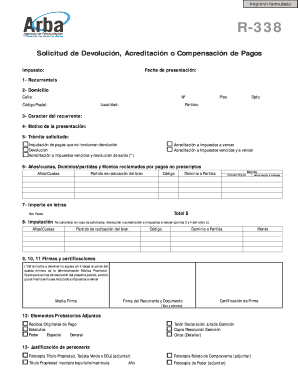
Get Formulario 338 Arba
How it works
-

Open form follow the instructions
-

Easily sign the form with your finger
-

Send filled & signed form or save
How to fill out the Formulario 338 Arba online
Filling out the Formulario 338 Arba online is an important step in managing payment claims effectively. This guide provides clear, step-by-step instructions to assist you through the process, ensuring a smooth experience regardless of your familiarity with legal documents.
Follow the steps to complete the Formulario 338 Arba online.
- Press the ‘Get Form’ button to access the Formulario 338 Arba and open it in the designated online editor.
- Begin by filling out the 'Recurrente/s' section, where you will enter the personal details of the individual making the request, including their name and identification details.
- In the 'Domicilio' section, provide the current address of the requester, including street, apartment number, locality, postal code, and department.
- Specify the 'Carácter del recurrente' to indicate the status of the requester, selecting from options such as property owner, usufructuary, or agent.
- Clearly outline the 'Motivo de la presentación', providing a detailed explanation for the request, such as overpayment or exemption status.
- In the 'Trámite solicitado' section, mark only one option with an X to indicate your specific request, such as reimbursement or acknowledgment of tax payment.
- Detail the years, domains, and amounts claimed for non-prescribed payments in the corresponding section, ensuring accuracy in the information provided.
- Indicate the total amount in both figures and letters in the 'Importe en letras' section, ensuring it matches the previous entries.
- Use the 'Imputación' section to specify the years and amounts to which the payments should be applied, leaving this blank if requesting reimbursement.
- Sign the document under 'Firmas y certificaciones', providing your signature and ensuring proper certification of the signature by a recognized authority.
- Attach required supporting documents in the 'Elementos Probatorios Adjuntos' section, marking the items you are including.
- Finally, review your completed form for any errors, ensuring there are no alterations or blank spaces, then proceed to save, download, print, or share the filled document.
Complete your Formulario 338 Arba online today to ensure efficient processing of your payment claims.
Register is the level of formality in a piece of writing. You could see it as a sliding scale, from formal language (for example, a legal document) to informal language (for example, a text message to a friend).
Industry-leading security and compliance
US Legal Forms protects your data by complying with industry-specific security standards.
-
In businnes since 199725+ years providing professional legal documents.
-
Accredited businessGuarantees that a business meets BBB accreditation standards in the US and Canada.
-
Secured by BraintreeValidated Level 1 PCI DSS compliant payment gateway that accepts most major credit and debit card brands from across the globe.