Loading
Get Proplan Cmf
How it works
-

Open form follow the instructions
-

Easily sign the form with your finger
-

Send filled & signed form or save
How to fill out the Proplan CMF online
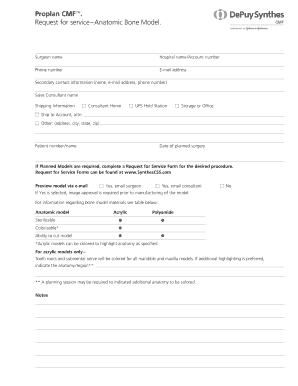
This guide provides a comprehensive overview of how to accurately complete the Proplan CMF Request for Service form for an anatomic bone model. Follow these steps to ensure that your submission is complete and meets all necessary requirements.
Follow the steps to complete the Proplan CMF form online
- Press the ‘Get Form’ button to access the Proplan CMF form online and open it in the provided editor.
- Begin by entering the surgeon's name in the designated field.
- Next, provide the hospital name and account number for accurate processing.
- Fill in your contact information, including your phone number and email address.
- Add the secondary contact information, which includes the name, email address, and phone number of an additional contact person.
- Indicate the name of the sales consultant who will assist with the request.
- Input the shipping information by selecting one of the provided options: Consultant Home, UPS Hold Station, Storage or Office, Ship to Account (including attention person), or Other (where you can specify the address, city, state, and zip code).
- Enter the patient number and name, followed by the date of the planned surgery.
- If planned models are required, complete a Request for Service Form for the desired procedure as outlined.
- Choose whether to preview the model via email by selecting the appropriate option: Yes, email surgeon; Yes, email consultant; or No.
- If 'Yes' is selected for email previews, note that image approval is required before manufacturing of the model.
- Select the model type needed, indicating whether the mandible is to be attached or detached as applicable.
- Complete any required fields as prompted and provide details about the model materials (Acrylic or Polyamide) and any additional anatomy that needs highlighting.
- Leave any notes in the designated section for additional information or special requests.
- Once all fields are completed, save your changes. You may then download, print, or share the filled form as needed.
Complete your Proplan CMF documents online to ensure a smooth submission process.
PROPLAN is a Project Planning and Scheduling Software for Planning, Scheduling, Controlling and Monitoring the detailed level activities of the various project functions such as Engineering, Ordering, Manufacturing and Delivery, Tendering, Construction, Commissioning, Close-out etc.