Loading
Form preview
  • US Legal Forms
  • Other Templates
  • More Forms
  • More Uncategorized Forms
  • Truckload Price Request Form - Sams Club

Get Truckload Price Request Form - Sams Club

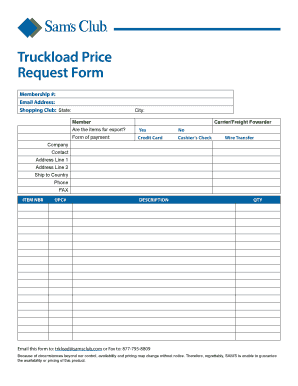
Truckload Price Request Form Membership #: Email Address: Shopping Club: State: City: Member Carrier/Freight Fowarder Are the items for export? Yes No Form of payment: Credit Card Cashiers Check Wire.

How it works

  1. Open form

    Open form follow the instructions

  2. Easily sign form

    Easily sign the form with your finger

  3. Share form

    Send filled & signed form or save

How to fill out the Truckload Price Request Form - Sams Club online

Filling out the Truckload Price Request Form - Sams Club is an essential process for users looking to request pricing for truckload services. This guide provides clear, step-by-step instructions to help you complete the form accurately and efficiently.

Follow the steps to successfully fill out the Truckload Price Request Form.

  1. Click ‘Get Form’ button to obtain the form and open it in the editor.
  2. Enter your membership number in the provided field. This information helps verify your account status with Sams Club.
  3. Input your email address accurately to ensure you receive confirmations and updates related to your request.
  4. Select your shopping club from the dropdown menu, which identifies the location associated with your account.
  5. Fill in your state and city in the corresponding fields to provide additional information about your location.
  6. Indicate whether you are a member or on behalf of a carrier or freight forwarder by selecting the appropriate option.
  7. Respond to the question regarding whether the items are for export by selecting 'Yes' or 'No'.
  8. Choose your preferred form of payment by selecting whether it will be via credit card, cashier’s check, or wire transfer.
  9. Fill in the company name and contact person's name to establish clear communication channels.
  10. Provide the address details including address line 1, address line 2 (if applicable), and the ship-to country for accurate delivery.
  11. Enter the phone number and FAX number if available, to facilitate further communication.
  12. List the item number (ITEM NBR) and corresponding UPC# for each product to ensure accurate pricing and identification.
  13. Write a brief description of each item, indicating the details necessary for the request.
  14. Specify the quantity (QTY) of each item you are requesting pricing for.
  15. After completing the form, you can save your changes, download, print, or share the form through your selected options.
  16. Email the completed form to trkload@samsclub.com or FAX it to 877-795-8809 for processing.

Get started on completing your Truckload Price Request Form online today!

Get form

Experience a faster way to fill out and sign forms on the web. Access the most extensive library of templates available.
Get form

Related content

10-K - SEC.gov
trade restrictions, changes in tariff and freight rates and disruptions in our supply...
Learn more
Purchasing Policy and Guidelines - The University...
... Rental Car Self Insurance Certificate · Sam's Club – UA Membership Info ... The...
Learn more
Visa Merchant Data Standards Manual...
Visa Merchant Category Code (MCC) Request Form . ... development, pricing, and sale of the...
Learn more

Related links form

Token Receipt Epc Form Laundry Agreement Format Application Form For Plagiarism Check Report. - Shivaji ...

Questions & Answers

Get answers to your most pressing questions about US Legal Forms API.

Contact support

2:52 4:39 How to Black Out or Redact Text On a PDF for Free Without Using Adobe ... YouTube Start of suggested clip End of suggested clip And then look for the fill color there are different options here a gradient hatching bitmap patternMoreAnd then look for the fill color there are different options here a gradient hatching bitmap pattern whatever you want if you click on pattern you see what you get and then you can change the

Open the PDF in Acrobat Pro, and then do one of the following: • Choose Tools > Redact. On the Edit menu, choose Redact Text & Images. Select the text or image in a PDF, right-click, and select Redact. Select the text or image in a PDF, choose Redact in the floating context-menu.

Redaction or sanitization is the process of removing sensitive information from a document so that it may be distributed to a broader audience.

How to black out text in a PDF file Open your PDF in Adobe's Acrobat online services. Select Tools, then Redact. Select text. Either double-click to select the text or drag to select lines of text. Apply redaction. Once you've selected the text you want to remove, click Save to apply the changes and save the document.

Sanitize your documents. Choose Tools › Redact. Click Sanitize Document in the top toolbar. Choose to selectively remove hidden information or remove all by clicking OK. Choose Save As… and save the file with a different name to avoid overwriting the original.

Click on the Edit tab at the top of the screen. Select Redact Text & Images. From there, you'll be able to add new redactions or remove the existing ones. Once you remove the redactions, the colored bars will go away, revealing the information underneath.

Get This Form Now!

Use professional pre-built templates to fill in and sign documents online faster. Get access to thousands of forms.
Get form
If you believe that this page should be taken down, please follow our DMCA take down processhere.
Get Truckload Price Request Form - Sams Club
Get form
  • Adoption
  • Bankruptcy
  • Contractors
  • Divorce
  • Home Sales
  • Employment
  • Identity Theft
  • Incorporation
  • Landlord Tenant
  • Living Trust
  • Name Change
  • Personal Planning
  • Small Business
  • Wills & Estates
  • Packages A-Z
  • Affidavits
  • Bankruptcy
  • Bill of Sale
  • Corporate - LLC
  • Divorce
  • Employment
  • Identity Theft
  • Internet Technology
  • Landlord Tenant
  • Living Wills
  • Name Change
  • Power of Attorney
  • Real Estate
  • Small Estates
  • Wills
  • All Forms
  • Forms A-Z
  • Other Templates
  • Legal Hub
  • About Us
  • Help Portal
  • Legal Resources
  • Blog
  • Affiliates
  • Contact Us
  • Delete My Account
  • Site Map
  • Industries
  • Forms in Spanish
  • Localized Forms
  • State-specific Forms
  • Forms Kit
  • Real Estate Handbook
  • All Guides
  • Notarize
  • Incorporation services
  • For Consumers
  • For Small Business
  • For Attorneys
  • USLegal
  • FormsPass
  • pdfFiller
  • signNow
  • altaFlow
  • DocHub
  • Instapage
Form Packages
  • Adoption
  • Bankruptcy
  • Contractors
  • Divorce
  • Home Sales
  • Employment
  • Identity Theft
  • Incorporation
  • Landlord Tenant
  • Living Trust
  • Name Change
  • Personal Planning
  • Small Business
  • Wills & Estates
  • Packages A-Z
Form Categories
  • Affidavits
  • Bankruptcy
  • Bill of Sale
  • Corporate - LLC
  • Divorce
  • Employment
  • Identity Theft
  • Internet Technology
  • Landlord Tenant
  • Living Wills
  • Name Change
  • Power of Attorney
  • Real Estate
  • Small Estates
  • Wills
  • All Forms
  • Forms A-Z
  • Other Templates
Customer Service
  • Legal Hub
  • About Us
  • Help Portal
  • Legal Resources
  • Blog
  • Affiliates
  • Contact Us
  • Delete My Account
  • Site Map
  • Industries
  • Forms in Spanish
  • Localized Forms
  • State-specific Forms
  • Forms Kit
Legal Guides
  • Real Estate Handbook
  • All Guides
Prepared for you
  • Notarize
  • Incorporation services
Our Customers
  • For Consumers
  • For Small Business
  • For Attorneys
Our Sites
  • USLegal
  • FormsPass
  • pdfFiller
  • signNow
  • altaFlow
  • DocHub
  • Instapage
Social Media
Call us now toll free:
+1 833 426 79 33
As seen in:
© Copyright 1999-2026 airSlate Legal Forms, Inc. 17 Station Street, Ste. 203, Brookline, MA 02445
  • Your Privacy Choices
  • Terms of Service
  • Privacy Notice
  • Content Takedown Policy
  • Bug Bounty Program