Loading
Form preview
  • US Legal Forms
  • Form Library
  • More Forms
  • More Uncategorized Forms
  • Litecontrol P Id 6124t8

Get Litecontrol P Id 6124t8

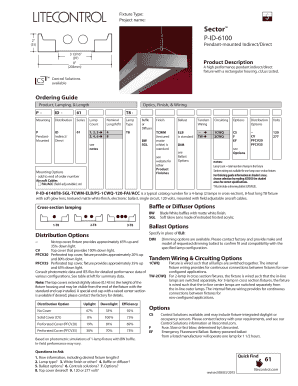
Fixture Type: Project name: Sector PID6100 2 " (51) Pendantmounted Indirect/Direct 3 13/16 " (97) 8 " (203mm) Product Description A high performance pendant indirect/direct fixture.

How it works

  1. Open form

    Open form follow the instructions

  2. Easily sign form

    Easily sign the form with your finger

  3. Share form

    Send filled & signed form or save

How to fill out the Litecontrol P Id 6124t8 online

Filling out the Litecontrol P Id 6124t8 online form is an essential step for ensuring your lighting fixture specifications are accurately documented. This guide offers step-by-step instructions to help you navigate each section of the form with confidence.

Follow the steps to complete the Litecontrol P Id 6124t8 form online

  1. Press the ‘Get Form’ button to access the Litecontrol P Id 6124t8 form and open it in your online editing platform.
  2. Input the project name in the designated field to specify the relevant project associated with the fixture.
  3. Select the appropriate fixture type from the options provided, such as pendant-mounted indirect/direct.
  4. Specify the nominal length of the fixture in feet, ensuring you choose from the correct range (e.g., 4, 8, or other specified lengths).
  5. Indicate the lamp count by selecting the total number of lamps you need, opting for configurations like 1, 2, or 3, to align with your lighting requirements.
  6. Choose the lamp type, such as T8, by selecting it from the drop-down menu.
  7. Select any additional options for finish and ballast from the available lists to customize your fixture.
  8. Provide any special instructions or preferences related to control solutions or circuiting options.
  9. Review all entered information for accuracy before proceeding to finalize your document.
  10. Once completed, save your changes, and choose to download, print, or share the Litecontrol P Id 6124t8 form as needed.

Begin your documentation process by filling out the Litecontrol P Id 6124t8 form online today!

Get form

Experience a faster way to fill out and sign forms on the web. Access the most extensive library of templates available.
Get form

Related links form

Tg Form Referral Slip For Gynae And Obs Patient Cibse Code For Lighting Pdf Camosun College General Application Form

Questions & Answers

Get answers to your most pressing questions about US Legal Forms API.

Contact support

How to remove sensitive data from PNG document using GroupDocs. Redaction App Select redaction type from "Redact" dropdown (text, metadata). Select your PNG document for redaction. Enter "Text search value" and "Redaction replace value". Click on "Redact Now" button to upload and redact your PNG file.

Sensitive Data Protection can redact sensitive data from many image types, including JPEG, BMP, and PNG.

Redaction is the striking out of specific information (private data like a social security number or a settlement amount) on an image, such as a TIFF or JPEG, or on a PDF.

Best practices for redacting a PDF Make a copy of the original PDF. Use a different color or font for the redacted text to stand out from the rest of the document. Use a highlighter or other marking tool to identify the confidential data you want to remove. Redact the data using a PDF editing program.

One of the easiest ways to redact information from an image file is to use a basic photo editor and overlay the sensitive information with a shape. Helpful Tips: Make sure the shape is set to 100% Opacity (or 0% transparency) Make sure to save the final image in a format that does not support layers.

Cropping and Redacting Images Safely Convert Image Formats. One way to remove "undisplayed" information from images is to convert the image to another format (gif->png, or jpeg->gif). ... Take a Screenshot. After your image looks "right", take a screenshot of it. ... Take a Photo. ... Remove Metadata. ... Summary.

Most image editors replace the original pixel. Normally, redactions should be impossible to 'unredact'.

How Do You Redact In Word Document Open the word document that you want to redact. Select the text that you want to redact. ... Go to the "Review" tab in the ribbon. In the "Protect" group, click the "Restrict Editing" button. In the "Restrict Formatting and Editing" pane, click the "Start Enforcing Protection" button.

Get This Form Now!

Use professional pre-built templates to fill in and sign documents online faster. Get access to thousands of forms.
Get form
If you believe that this page should be taken down, please follow our DMCA take down processhere.

Industry-leading security and compliance

US Legal Forms protects your data by complying with industry-specific security standards.
  • In businnes since 1997
    25+ years providing professional legal documents.
  • Accredited business
    Guarantees that a business meets BBB accreditation standards in the US and Canada.
  • Secured by Braintree
    Validated Level 1 PCI DSS compliant payment gateway that accepts most major credit and debit card brands from across the globe.
Get Litecontrol P Id 6124t8
Get form
  • Adoption
  • Bankruptcy
  • Contractors
  • Divorce
  • Home Sales
  • Employment
  • Identity Theft
  • Incorporation
  • Landlord Tenant
  • Living Trust
  • Name Change
  • Personal Planning
  • Small Business
  • Wills & Estates
  • Packages A-Z
  • Affidavits
  • Bankruptcy
  • Bill of Sale
  • Corporate - LLC
  • Divorce
  • Employment
  • Identity Theft
  • Internet Technology
  • Landlord Tenant
  • Living Wills
  • Name Change
  • Power of Attorney
  • Real Estate
  • Small Estates
  • Wills
  • All Forms
  • Forms A-Z
  • Form Library
  • Legal Hub
  • About Us
  • Help Portal
  • Legal Resources
  • Blog
  • Affiliates
  • Contact Us
  • Delete My Account
  • Site Map
  • Industries
  • Forms in Spanish
  • Localized Forms
  • State-specific Forms
  • Forms Kit
  • Real Estate Handbook
  • All Guides
  • Notarize
  • Incorporation services
  • For Consumers
  • For Small Business
  • For Attorneys
  • USLegal
  • FormsPass
  • pdfFiller
  • signNow
  • altaFlow
  • DocHub
  • Instapage
Form Packages
  • Adoption
  • Bankruptcy
  • Contractors
  • Divorce
  • Home Sales
  • Employment
  • Identity Theft
  • Incorporation
  • Landlord Tenant
  • Living Trust
  • Name Change
  • Personal Planning
  • Small Business
  • Wills & Estates
  • Packages A-Z
Form Categories
  • Affidavits
  • Bankruptcy
  • Bill of Sale
  • Corporate - LLC
  • Divorce
  • Employment
  • Identity Theft
  • Internet Technology
  • Landlord Tenant
  • Living Wills
  • Name Change
  • Power of Attorney
  • Real Estate
  • Small Estates
  • Wills
  • All Forms
  • Forms A-Z
  • Form Library
Customer Service
  • Legal Hub
  • About Us
  • Help Portal
  • Legal Resources
  • Blog
  • Affiliates
  • Contact Us
  • Delete My Account
  • Site Map
  • Industries
  • Forms in Spanish
  • Localized Forms
  • State-specific Forms
  • Forms Kit
Legal Guides
  • Real Estate Handbook
  • All Guides
Prepared for you
  • Notarize
  • Incorporation services
Our Customers
  • For Consumers
  • For Small Business
  • For Attorneys
Our Sites
  • USLegal
  • FormsPass
  • pdfFiller
  • signNow
  • altaFlow
  • DocHub
  • Instapage
Social Media
Call us now toll free:
+1 833 426 79 33
As seen in:
© Copyright 1999-2026 airSlate Legal Forms, Inc. 3720 Flowood Dr, Flowood, Mississippi 39232
  • Your Privacy Choices
  • Terms of Service
  • Privacy Notice
  • Content Takedown Policy
  • Bug Bounty Program