Loading
Get Exterior Siding Stucco Eifs Disclosure - Clientconnect Brokertec
How it works
-

Open form follow the instructions
-

Easily sign the form with your finger
-

Send filled & signed form or save
How to fill out the EXTERIOR SIDING STUCCO EIFS DISCLOSURE - Clientconnect Brokertec online
The exterior siding stucco EIFS disclosure is an essential document for buyers and sellers in real estate transactions. This guide provides you with clear, step-by-step instructions on how to complete the form accurately and effectively.
Follow the steps to complete your disclosure form easily.
- Click ‘Get Form’ button to obtain the form and open it in the designated editor.
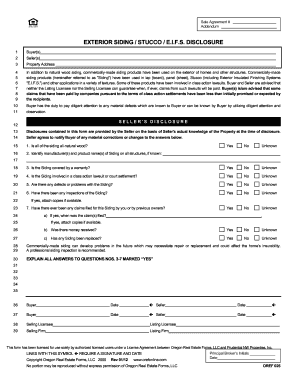
- Begin by filling out the 'Buyer(s)' section with the names of the individuals or entities purchasing the property.
- Next, complete the 'Seller(s)' section with the names of the individuals or entities selling the property.
- Enter the 'Property Address' accurately to avoid any confusion regarding the location of the property.
- Review the information provided about commercially-made siding products and their potential involvement in class action lawsuits. Ensure you understand this context as it may affect the transaction.
- Answer the seller's disclosure questions regarding the siding. You will indicate whether the siding is all-natural wood, the manufacturer and product name of the siding, warranty status, involvement in lawsuits, existing defects, inspection history, claims filed, and whether any siding has been replaced.
- If you answered 'Yes' to any of the questions from 3 to 7, provide detailed explanations in the designated section.
- Finish by signing and dating the form in the relevant signature fields for both buyers and sellers.
- Once the form is completed, you may save changes, download, print, or share the document as necessary.
Complete your disclosures online today to ensure a smooth real estate transaction.
Organize your bookmarks On your computer, open Chrome. At the top right, click More Bookmarks. Bookmark Manager. Drag a bookmark up or down, or drag a bookmark into a folder on the left. You can also copy and paste your bookmarks in the order you want.