Loading
Get Cobbassessor
How it works
-

Open form follow the instructions
-

Easily sign the form with your finger
-

Send filled & signed form or save
How to fill out the Cobbassessor online
This guide provides clear and supportive instructions on how to complete the Cobbassessor form online. By following these steps, users will ensure they accurately submit their appeal for assessment review.
Follow the steps to successfully fill out your Cobbassessor form.
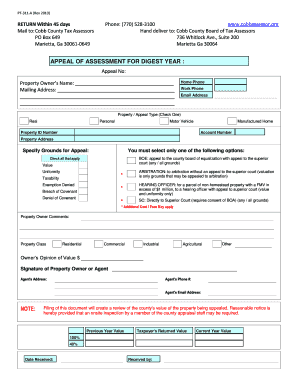
- Press the ‘Get Form’ button to access the Cobbassessor form and open it in your preferred editor.
- Start by entering the appeal number in the designated field at the top of the form. This number helps identify your specific appeal case.
- Provide the property owner’s name. Ensure you enter the full legal name as it appears on the property records.
- Fill in the mailing address, including street address, city, state, and zip code. This is where any correspondence regarding your appeal will be sent.
- Enter the home phone number, work phone number, and email address for contact purposes. This information will assist in effective communication.
- Select the type of property or appeal by checking the appropriate box: Real, Personal, Motor Vehicle, or Manufactured Home.
- Input the property ID number and account number, which help in identifying the specific property you are appealing.
- Indicate the property address where the assessed property is located.
- In the ‘Specify grounds for appeal’ section, select only one option from the provided list that best represents your reason for the appeal.
- If applicable, provide your comments regarding the property assessment in the 'Property Owner Comments' section.
- Choose the property class that applies to your situation: Residential, Commercial, Industrial, Agricultural, or Other.
- Indicate your opinion of the property's value by entering the amount in the designated field.
- Sign the form in the space provided for the property owner or agent, indicating consent for the appeal.
- If applicable, enter the agent's address, phone number, and email address for further communication.
- Review all the information for accuracy before saving the document. You can choose to download, print, or share the completed form.
Complete your Cobbassessor document online today for a smooth appeal process.