Loading
Form preview
  • US Legal Forms
  • Form Library
  • More Forms
  • More Uncategorized Forms
  • Lunch Application Letter 2009doc - Hsalaredo

Get Lunch Application Letter 2009doc - Hsalaredo

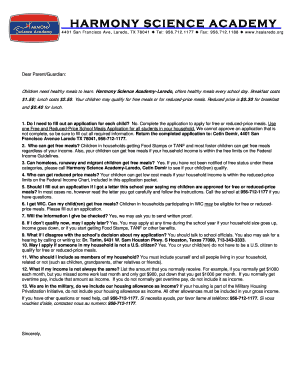
HARMONY SCIENCE ACADEMY 4401 San Francisco Ave, Laredo, TX 78041 Tel: 956.712.1177 Fax: 956.712.1188 www.hsalaredo.org Dear Parent/Guardian: Children need healthy meals to learn. Harmony Science AcademyLaredo,.

How it works

  1. Open form

    Open form follow the instructions

  2. Easily sign form

    Easily sign the form with your finger

  3. Share form

    Send filled & signed form or save

How to use or fill out the Lunch Application Letter 2009doc - Hsalaredo online

Filling out the Lunch Application Letter 2009doc - Hsalaredo online is a straightforward process that ensures your children have access to healthy meals at school. This guide provides clear, step-by-step instructions to assist you in completing the application accurately and efficiently.

Follow the steps to fill out your application effectively

  1. Click the ‘Get Form’ button to obtain the application form and have it opened in your online editor.
  2. Begin with Part 1, where you will list the names of all children in school. Include their school name and grade. The social security number, student ID, or date of birth is optional.
  3. If you are applying for a foster child, check the appropriate box in Part 2 and provide the child’s personal use monthly income if applicable. Then skip directly to Part 4.
  4. In Part 3, list each person in your household. For every person reporting income, include their name, the income amount, and the frequency (weekly, bi-weekly, semi-monthly, or monthly).
  5. Make sure to report all sources of income thoroughly, including employment, benefits, and any other financial support. For those without income, check the corresponding box.
  6. Part 4 requires an adult household member to sign the application. They must also include their social security number or indicate if they do not have one.
  7. Review the completed application carefully for accuracy and completeness before saving your changes. You have the option to download, print, or share the form as needed.

Ensure that your application is submitted online to provide your children with access to nutritious meals at school.

Get form

Experience a faster way to fill out and sign forms on the web. Access the most extensive library of templates available.
Get form

Related content

Evaluation of Texas Charter Schools 2009–10
by LL Taylor · 2011 — 2009–10. July 2011. Submitted to: Texas Education Agency...
Learn more
new hire forms checklist - Honeywell
Reasonable Accommodation Request Form – Complete and return the form only if...
Learn more

Related links form

Understanding Construction Drawings 5th Edition Answers Understanding Construction Drawings 5th STATUTORY DECLARATION PARTNER VISA (SPONSOR) Dallas-Morris Drilling, Inc. Application For Employment Version 1.00 ... Era Tenancy Agreement Template

Questions & Answers

Get answers to your most pressing questions about US Legal Forms API.

Contact support

Choose the picture you want, and select Insert. On the Layout tab, under Page Background, select Watermark. Select Picture. Choose Select Picture, and then locate the picture that you want to use as a watermark. Choose Insert, Notes:

0:29 1:40 How to edit watermark in Word - YouTube YouTube Start of suggested clip End of suggested clip Then click on the watermark. And now you will see the word add tool appear. Double click on theMoreThen click on the watermark. And now you will see the word add tool appear. Double click on the watermark. Again to make the watermark textbook active. Now you can edit the watermark.

On the Design tab, select Watermark > Custom Watermark. Choose Picture Watermark and select a picture, or choose Text watermark and type your watermark text in the Text box. Click OK.

How to add a non removable watermark to a Word document Open your Word document and press “File > Export > Create XPF/PDF document”. ... Right-click your PDF in Windows File Explorer and select the option “Make Secure PDF”. ... Open the View Watermarks or Print Watermarks tab, depending on where you want to add it.

Open Canva or download our free mobile app on your phone or tablet. Design a watermark. If you don't have a watermark yet, explore dozens of ready-made watermark designs you can personalize by typing “Watermark” or “Logo” in the search bar. ... Upload your photo. ... Place your watermark. ... Save your watermarked photo.

By default, Microsoft Word has six predefined watermarks.

Has your document been protected? You can't add a custom watermark to a protected document - you have to unprotect it first.

Insert a watermark on just one page Select where you want the watermark to be on the page. Select Design > Watermark > right-click the watermark you want, and select Insert at Current Document Position. The watermark appears as a text box.

Get This Form Now!

Use professional pre-built templates to fill in and sign documents online faster. Get access to thousands of forms.
Get form
If you believe that this page should be taken down, please follow our DMCA take down processhere.

Industry-leading security and compliance

US Legal Forms protects your data by complying with industry-specific security standards.
  • In businnes since 1997
    25+ years providing professional legal documents.
  • Accredited business
    Guarantees that a business meets BBB accreditation standards in the US and Canada.
  • Secured by Braintree
    Validated Level 1 PCI DSS compliant payment gateway that accepts most major credit and debit card brands from across the globe.
Get Lunch Application Letter 2009doc - Hsalaredo
Get form
  • Adoption
  • Bankruptcy
  • Contractors
  • Divorce
  • Home Sales
  • Employment
  • Identity Theft
  • Incorporation
  • Landlord Tenant
  • Living Trust
  • Name Change
  • Personal Planning
  • Small Business
  • Wills & Estates
  • Packages A-Z
  • Affidavits
  • Bankruptcy
  • Bill of Sale
  • Corporate - LLC
  • Divorce
  • Employment
  • Identity Theft
  • Internet Technology
  • Landlord Tenant
  • Living Wills
  • Name Change
  • Power of Attorney
  • Real Estate
  • Small Estates
  • Wills
  • All Forms
  • Forms A-Z
  • Form Library
  • Legal Hub
  • About Us
  • Help Portal
  • Legal Resources
  • Blog
  • Affiliates
  • Contact Us
  • Delete My Account
  • Site Map
  • Industries
  • Forms in Spanish
  • Localized Forms
  • State-specific Forms
  • Forms Kit
  • Real Estate Handbook
  • All Guides
  • Notarize
  • Incorporation services
  • For Consumers
  • For Small Business
  • For Attorneys
  • USLegal
  • FormsPass
  • pdfFiller
  • signNow
  • altaFlow
  • DocHub
  • Instapage
Form Packages
  • Adoption
  • Bankruptcy
  • Contractors
  • Divorce
  • Home Sales
  • Employment
  • Identity Theft
  • Incorporation
  • Landlord Tenant
  • Living Trust
  • Name Change
  • Personal Planning
  • Small Business
  • Wills & Estates
  • Packages A-Z
Form Categories
  • Affidavits
  • Bankruptcy
  • Bill of Sale
  • Corporate - LLC
  • Divorce
  • Employment
  • Identity Theft
  • Internet Technology
  • Landlord Tenant
  • Living Wills
  • Name Change
  • Power of Attorney
  • Real Estate
  • Small Estates
  • Wills
  • All Forms
  • Forms A-Z
  • Form Library
Customer Service
  • Legal Hub
  • About Us
  • Help Portal
  • Legal Resources
  • Blog
  • Affiliates
  • Contact Us
  • Delete My Account
  • Site Map
  • Industries
  • Forms in Spanish
  • Localized Forms
  • State-specific Forms
  • Forms Kit
Legal Guides
  • Real Estate Handbook
  • All Guides
Prepared for you
  • Notarize
  • Incorporation services
Our Customers
  • For Consumers
  • For Small Business
  • For Attorneys
Our Sites
  • USLegal
  • FormsPass
  • pdfFiller
  • signNow
  • altaFlow
  • DocHub
  • Instapage
Social Media
Call us now toll free:
+1 833 426 79 33
As seen in:
© Copyright 1999-2026 airSlate Legal Forms, Inc. 3720 Flowood Dr, Flowood, Mississippi 39232
  • Your Privacy Choices
  • Terms of Service
  • Privacy Notice
  • Content Takedown Policy
  • Bug Bounty Program