Loading
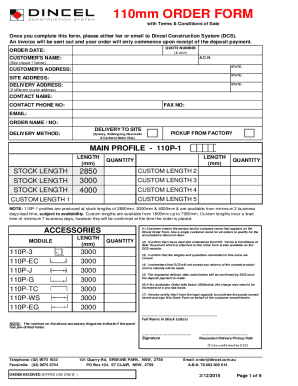
Get Dincel Order Form
How it works
-

Open form follow the instructions
-

Easily sign the form with your finger
-

Send filled & signed form or save
How to fill out the Dincel Order Form online
Filling out the Dincel Order Form online is a straightforward process that allows users to efficiently place their orders for construction materials. This guide provides step-by-step instructions to help you complete the form accurately and effectively.
Follow the steps to complete your Dincel Order Form online.
- Click the 'Get Form' button to obtain the order form and open it in your preferred digital editor.
- Enter your quote number, if applicable, followed by the order date. This helps track your order effectively.
- Fill in the customer's name and Australian Company Number (A.C.N.) as required. This identifies the ordering entity.
- Provide the customer's address, including the state. This information is vital for order delivery.
- Complete the site address and the delivery address if they differ from the site address. Ensure accuracy for smooth delivery.
- Enter the contact name, fax number, phone number, and email address to facilitate communication regarding your order.
- Specify the order name or number, ensuring it correlates with your project for effective tracking.
- Choose the delivery method, selecting options for areas like Sydney, Wollongong, Newcastle, and Canberra Metro, or indicate if you prefer to pick up from the factory.
- Indicate the main profile specifications, including the length (in mm) and quantity for stock lengths and any custom lengths if applicable.
- Detail the accessories and their respective quantities, ensuring they match your project needs.
- Review the terms and conditions carefully. Confirm that you have read and understand them by marking the checkbox.
- Sign the document with your full name in block letters, confirming your legal capacity to order the goods on behalf of the customer.
- Indicate the requested delivery or pickup date, allowing Dincel Construction System to schedule accordingly.
- Once completed, save the changes made to the form. You may then download, print, or share your filled-out Dincel Order Form as needed.
Start filling out the Dincel Order Form online today to place your order seamlessly.
Related links form
HTML Dropdown Default Value To change the default value, use the selected boolean attribute. Simply add it to the opening tag of the <option> tag you want to display as the default, after its value attribute.