Loading
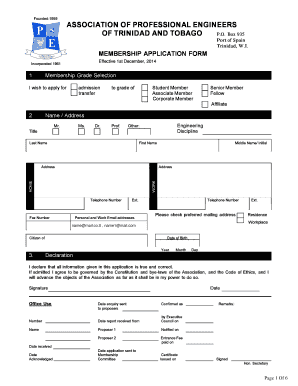
Get Apett Membership Form
How it works
-

Open form follow the instructions
-

Easily sign the form with your finger
-

Send filled & signed form or save
How to fill out the Apett Membership Form online
Completing the Apett Membership Form online is a straightforward process designed to facilitate your application for membership in the Association of Professional Engineers of Trinidad and Tobago. This guide provides step-by-step instructions to help you fill out the form accurately and efficiently.
Follow the steps to complete your membership application.
- Click the 'Get Form' button to access the Apett Membership Form and open it in your preferred online editor.
- In the 'Membership Grade Selection' section, indicate your desired membership grade by selecting from options such as Student Member, Associate Member, Corporate Member, Senior Member, Fellow, or Affiliate.
- Fill in your personal details in the 'Name / Address' section, including your title (Mr., Ms., Dr., Prof.), last name, first name, and middle name/initial. Provide your home and work addresses, telephone numbers, and email addresses. Check your preferred mailing address as either residence or workplace.
- In the 'Date of Birth' section, provide your date of birth in the required format (day, month, year).
- Read and accept the declaration by ensuring all provided information is true and correct. Sign and date the form at the designated area.
- Complete the 'Professional Work Experience' section by listing your relevant work history, including dates, job titles, responsibilities, and organizations. Use a separate sheet if necessary.
- Fill out the 'Education' section with the name of the institution you attended, the degree received, and the date received.
- Answer the 'Professional Information' section by indicating if you are registered with the Board of Engineering of Trinidad and Tobago. If so, provide your registration number and include any memberships in other professional institutions.
- The 'Current Organisation Tree' section requires you to illustrate your position within your organization, provide names and qualifications of those in your hierarchy, and ensure initials from your proposer are included.
- Lastly, complete the 'Attestation by Proposers' section with signatures from two proposers who are members of the Association, along with their names, initials, and addresses.
- After filling out all sections, ensure your information is accurate. Save your changes, and download, print, or share the completed form as necessary.
Start your online application process today by filling out the Apett Membership Form.
Get form
Experience a faster way to fill out and sign forms on the web. Access the most extensive library of templates available.
P.O. Box 935 Port of Spain Trinidad, W.I.
Get This Form Now!
Use professional pre-built templates to fill in and sign documents online faster. Get access to thousands of forms.
Industry-leading security and compliance
US Legal Forms protects your data by complying with industry-specific security standards.
-
In businnes since 199725+ years providing professional legal documents.
-
Accredited businessGuarantees that a business meets BBB accreditation standards in the US and Canada.
-
Secured by BraintreeValidated Level 1 PCI DSS compliant payment gateway that accepts most major credit and debit card brands from across the globe.