Get Tat De Frais Remplir Lissue De La Mission N
How it works
-

Open form follow the instructions
-

Easily sign the form with your finger
-

Send filled & signed form or save
How to fill out the TAT DE FRAIS Remplir Lissue De La Mission N online
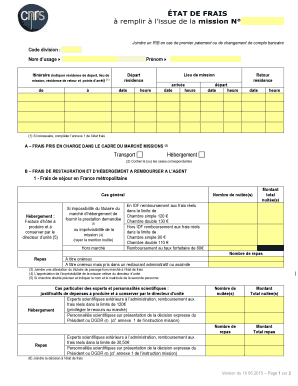
This guide provides a clear and comprehensive overview of how to complete the TAT DE FRAIS Remplir Lissue De La Mission N form online. By following these step-by-step instructions, users can efficiently fill out the required fields for expense reimbursement after their missions.
Follow the steps to accurately complete your expense report.
- Click the ‘Get Form’ button to access the TAT DE FRAIS Remplir Lissue De La Mission N form. This will open the document in the online editor for you to begin filling it out.
- Enter your division code, last name, and first name in the designated fields. Ensure that all names are accurate to prevent any delays in processing your reimbursement.
- Fill out the itinerary section, including your departure residence, mission location, return residence, and any stopping points. Indicate the dates and times for each segment of your journey.
- In section A, select the appropriate boxes for expenses covered under the mission contract. This includes transportation and accommodation costs.
- Proceed to section B to list expenses for meals and accommodations. Provide details on overnight stays, including the number of nights and total amounts, along with receipts where applicable.
- If applicable, complete the sections for expenses incurred when traveling overseas or in overseas territories, noting the required details for reimbursement.
- In section C, outline transportation expenses, indicating whether you are claiming indemnity for personal vehicle use or actual travel expenses. Attach the necessary supporting documents.
- Calculate any allowances based on the introduced scales and ensure to detail the amounts you are requesting for reimbursement in section E.
- Complete section F with any observations or additional explanations that could assist in financial processing. This is an opportunity to clarify anything unusual about your claims.
- After filling out the entire form, review all entries for accuracy. Then, save your changes, download, print, or share the form as needed.
Start filling out your TAT DE FRAIS Remplir Lissue De La Mission N form online today to ensure a smooth expense reimbursement process.
1:19 3:14 How to Set Up & Use Pause: Break Reminders - YouTube YouTube Start of suggested clip End of suggested clip Click enable notifications. In the top right corner of your screen you should see a pop-up appear.MoreClick enable notifications. In the top right corner of your screen you should see a pop-up appear. Click options then select allow to enable notifications. In the main pause window click.
Industry-leading security and compliance
-
In businnes since 199725+ years providing professional legal documents.
-
Accredited businessGuarantees that a business meets BBB accreditation standards in the US and Canada.
-
Secured by BraintreeValidated Level 1 PCI DSS compliant payment gateway that accepts most major credit and debit card brands from across the globe.