Loading
Get Comm Hd Plan Flyer Saf Hd Max - Cignal
How it works
-

Open form follow the instructions
-

Easily sign the form with your finger
-

Send filled & signed form or save
How to fill out the Comm HD Plan Flyer SAF HD Max - Cignal online
Filling out the Comm HD Plan Flyer SAF HD Max - Cignal form online can be straightforward with the right guidance. This document outlines the steps necessary to ensure that users accurately complete their application, making the process efficient and clear.
Follow the steps to successfully complete your application.
- Click the ‘Get Form’ button to obtain the form and open it in your editing tool.
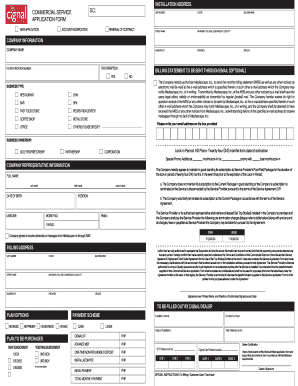
- Begin by filling in the installation address section, which includes fields for the account type, unit number, floor, building name, street name, barangay/village/subdivision/locality, municipality, and province. Ensure that all information is correct and accurate.
- Next, move to the company information section. Input the company name, tax exemption details, and tax identification number. Indicate whether you wish to receive billing statements via email, selecting 'Yes' or 'No' as appropriate.
- In the business type section, select the type of business from the options provided, such as restaurant, gym, bar, etc. If your business type does not appear, select ‘Others’ and specify.
- Continue to fill out the company representative information, including full name, position, date of birth, contact numbers, and email address.
- Complete the billing address section with the same details as the installation address. Ensure consistency to avoid future communication issues.
- Review the payment and plan options thoroughly. Choose between cash and lease options for the plan to be purchased and indicate the number of boxes required.
- At the end of the form, sign where indicated and write the printed name along with the position of the authorized signatory. Date the document appropriately.
- Once all sections are filled out, review the entire form for accuracy. Make any necessary corrections before finalizing.
- Finally, save your changes, download a copy for your records, print the document if necessary, or share it as required.
Complete your application online today for the Comm HD Plan Flyer SAF HD Max - Cignal and enjoy seamless service.
Related links form
Cignal TV Unplug your Cignal box from the power outlet. Carefully unscrew the circular cable (RG6) located at the back of your box. Once the cable has been removed, plug in the power source of your Cignal box and wait for it to reboot. Your TV screen will show a "No Signal" error message.