Loading
Get Ncysa Policy #
How it works
-

Open form follow the instructions
-

Easily sign the form with your finger
-

Send filled & signed form or save
How to fill out the NCYSA Policy # online
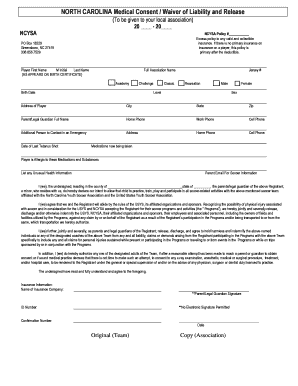
Filling out the NCYSA Policy # online is a straightforward process that ensures your player is registered and covered for soccer activities. This guide provides clear, step-by-step instructions to help you complete the form efficiently.
Follow the steps to fill out the NCYSA Policy # online.
- Click the ‘Get Form’ button to obtain the form and open it in your preferred editor.
- Begin by entering the player's first name, middle initial, and last name exactly as they appear on the birth certificate.
- Select the full association name from the available options: Academy, Challenge, Classic, or Recreation.
- Fill in the player's birth date, jersey number, level, and sex, indicating either male or female.
- Provide the complete address of the player, including city, state, and zip code.
- Enter the full name of a parent or legal guardian, along with their home, work, and cell phone numbers.
- List an additional contact person in case of an emergency, including their address and phone numbers.
- Indicate the date of the player's last tetanus shot and any medications currently being taken.
- Specify any medications and substances to which the player is allergic.
- Provide the parent's email address for receiving soccer-related information and list any unusual health information regarding the player.
- Review the declaration statement thoroughly, confirming your intent to allow the player to participate in soccer activities.
- Sign the form as a parent or legal guardian, including the ID number. Note that electronic signatures are not permitted.
- Finally, enter the date of signing, and ensure you understand the insurance information requirements.
- After completing the form, save your changes. You may then download, print, or share the finished document as needed.
Complete the NCYSA Policy # online to ensure your player is registered and ready for the season.
By adding onchange="document. getElementById('formName'). submit()" to each checkbox, you'll submit any time a checkbox is changed. If you're OK with jQuery, it's even easier (and unobtrusive):
Industry-leading security and compliance
US Legal Forms protects your data by complying with industry-specific security standards.
-
In businnes since 199725+ years providing professional legal documents.
-
Accredited businessGuarantees that a business meets BBB accreditation standards in the US and Canada.
-
Secured by BraintreeValidated Level 1 PCI DSS compliant payment gateway that accepts most major credit and debit card brands from across the globe.