Loading
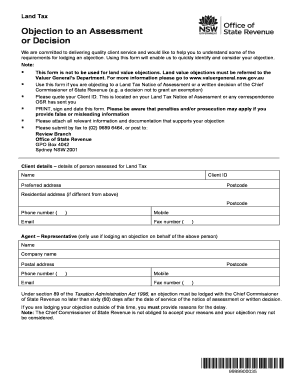
Get Objection To An Assessment Or Decision - Land Tax - Office Of State - Osr Nsw Gov
How it works
-

Open form follow the instructions
-

Easily sign the form with your finger
-

Send filled & signed form or save
How to use or fill out the Objection To An Assessment Or Decision - Land Tax - Office Of State - Osr Nsw Gov online
This guide provides a clear, step-by-step approach to filling out the Objection To An Assessment Or Decision form related to land tax. By following these instructions, users will effectively communicate their objections and ensure that all necessary information is included.
Follow the steps to complete the objection form online.
- Click ‘Get Form’ button to access the form and open it in your preferred editor.
- Enter your client details in the designated fields. This includes your name, Client ID found on your notice of assessment, preferred address, and contact information such as phone and email.
- If you are submitting the objection on behalf of another person, fill out the agent or representative details as applicable. Provide the name, company name, contact information, and address.
- Specify the tax year(s) and the date of assessment or decision. Ensure these dates are accurate to avoid any processing delays.
- Indicate whether your objection is being lodged within the sixty (60) day deadline. If 'No', provide a clear explanation for the delay and attach any supporting documentation.
- Select the reasons for your objection from the provided options. If applicable, specify any additional reasons that may support your case.
- In the remaining sections, detail the grounds of your objection. If you require more space, attach additional sheets as necessary.
- Complete the declaration section by printing your name, signing, and dating the form to confirm the accuracy of the information provided.
- Attach any relevant supporting documentation, such as bills or agreements that validate your claims.
- Once the form is complete, review all entries for accuracy. You then have the option to save changes, download, print, or share the form as required.
Complete your objection to an assessment online today to ensure your concerns are heard.
(Monday – Friday, 8.30 am – 5.00 pm) 1300 139 814* *Interstate clients please call (02) 7808 6900 .revenue.nsw.gov.au objection@revenue.nsw.gov.au Help in community languages is available.
Industry-leading security and compliance
US Legal Forms protects your data by complying with industry-specific security standards.
-
In businnes since 199725+ years providing professional legal documents.
-
Accredited businessGuarantees that a business meets BBB accreditation standards in the US and Canada.
-
Secured by BraintreeValidated Level 1 PCI DSS compliant payment gateway that accepts most major credit and debit card brands from across the globe.