Loading
Get Zav - Arbeitsmarktzulassung - Bewerbungsformular 2012 Bb - Uvlf
How it works
-

Open form follow the instructions
-

Easily sign the form with your finger
-

Send filled & signed form or save
How to fill out the ZAV - Arbeitsmarktzulassung - Bewerbungsformular 2012 Bb - Uvlf online
Filling out the ZAV - Arbeitsmarktzulassung - Bewerbungsformular 2012 Bb - Uvlf online can be a straightforward process when guided by a clear set of instructions. This guide is designed to help users navigate the application form efficiently and correctly.
Follow the steps to successfully complete the application form.
- Press the ‘Get Form’ button to gain access to the application form and open it in an editor.
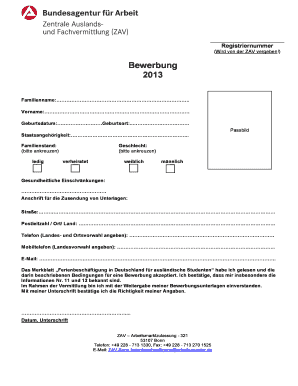
- Begin by entering your last name (Familienname) in the designated field. Ensure the spelling matches your official documents.
- Next, provide your first name (Vorname) in the next field. Again, be sure to match the spelling exactly.
- Input your date of birth (Geburtsdatum) and place of birth (Geburtsort). Use the prescribed format and double-check for accuracy.
- Indicate your nationality (Staatsangehörigkeit) by filling in the relevant field.
- Mark your marital status (Familienstand) by checking the appropriate box, either 'single' (ledig) or 'married' (verheiratet).
- Attach a recent passport-sized photo (Passbild), ensuring it meets the form requirements.
- Specify your gender (Geschlecht) by checking the correct box for either female (weiblich) or male (männlich).
- Address any health constraints (Gesundheitliche Einschränkungen) if applicable. This area should include any relevant medical considerations.
- Provide your mailing address for document delivery (Anschrift für die Zusendung von Unterlagen) including street, postal code, city, and country.
- Enter your phone number, including the country and area codes, in the specified field.
- Fill in your mobile phone number (Mobiltelefon) including the country code.
- Provide a valid email address (E-Mail) for communication regarding your application.
- Acknowledge that you have read the information sheet regarding holiday employment conditions and confirm your acceptance by ticking the appropriate box.
- Express your agreement to the sharing of your application documents as part of the recruitment process by checking the designated box.
- Indicate the date and provide your signature to affirm the accuracy of your details.
- Complete the previous employment section (Bisherige Beschäftigungen) by filling in the requested details about your work history.
- Indicate if you have previously been in Germany, including the duration and the reason for your visit.
- List your hobbies (Hobbys) in the designated area to give additional context to your application.
- Specify any language skills (Sprachen) other than German in the appropriate section.
- Indicate your driver's license status (Führerschein) by checking the applicable boxes and attaching a copy if required.
- Fill out your field of study (Studienfach) and mention your semester break (Semesterferien) if relevant.
- Indicate the desired employment type (Gewünschte Tätigkeit) by checking the relevant boxes for your area of interest.
- Specify your desired employment period (Gewünschter Beschäftigungszeitraum) by filling in the start and end dates.
- Once all fields are completed, you may save your changes, download, print, or share the completed form as needed.
Begin completing your application online today!
How to create a checklist in Excel Enable the Developer menu. In Excel, you can insert a checkbox control from the Developer menu. ... Add your checklist items. Next, begin your checklist by adding items to it. ... Insert checkboxes next to the items. ... Make your checkbox look good. ... Run through your checklist.