Loading
Get Ppe 52261 Cf Vet Fee 5728-11indd - Petplan Equine
How it works
-

Open form follow the instructions
-

Easily sign the form with your finger
-

Send filled & signed form or save
How to fill out the PPE 52261 CF Vet Fee 5728-11indd - Petplan Equine online
This guide provides a comprehensive overview of filling out the PPE 52261 CF Vet Fee 5728-11indd - Petplan Equine form online. By following these steps, users can ensure that all necessary information is accurately completed to facilitate a smooth claims process.
Follow the steps to accurately complete your claim form.
- Click ‘Get Form’ button to obtain the form and open it in the appropriate editor.
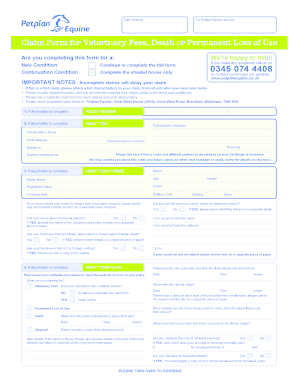
- Begin by selecting whether you are completing this form for a new condition or a continuation condition. This helps in categorizing your claim appropriately.
- In the first section, titled 'About You,' fill in your policyholder details, including your name, address, email address (which is required for electronic payments), mobile number, and a daytime telephone number.
- Complete the 'About Your Horse' section by providing information about your horse, including its breed, stable name, age, registered name, and color. Record the purchase date and height as well.
- Indicate whether your horse has previously been insured or has had any prior illnesses or injuries. If yes, you will need to provide that information on separate paper.
- In the 'About Your Claim' section, specify the date and time when the illness or injury was first noticed and provide details on what you are claiming for, along with any previous claims for the same condition.
- Complete the declaration section at the end of the form. You must sign to authorize Petplan to process your claim and agree on how you wish to receive your payment (either direct to the vet or to you).
- After filling in all sections, ensure you have attached any required documents, such as clinical histories or invoices, as specified within the form.
- Review all entered information for accuracy before saving your changes. Convert the document if necessary and prepare for submission.
- Once everything is correct, proceed to save the completed form, download, print, or share it according to your needs.
Complete your Petplan Equine forms online now to ensure a timely claims process!
Online payment security tips Use two-factor authentication. ... Verify every transaction. ... Choose a secure e-commerce platform and payment provider. ... Buy cyber liability insurance. ... Use a personal verification system. ... Don't store customer payment data. ... Get an SSL certificate for your site. ... Ensure PCI compliance.