Loading
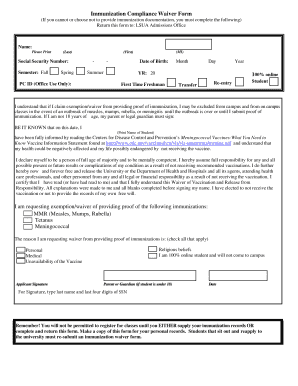
Get Immunization Compliance Waiver Form - Lsua Online - Elearn Lsua
How it works
-

Open form follow the instructions
-

Easily sign the form with your finger
-

Send filled & signed form or save
How to fill out the Immunization Compliance Waiver Form - LSUA Online - Elearn Lsua
Completing the Immunization Compliance Waiver Form is essential for students who cannot or choose not to provide immunization documentation. This guide will walk you through each section of the form to ensure you complete it accurately and efficiently.
Follow the steps to fill out the form correctly.
- Click ‘Get Form’ button to obtain the form and open it in your preferred editing environment.
- Begin by clearly printing your name, including your middle initial, on the designated line.
- Provide your Social Security Number in the specified field to identify your records.
- Indicate the semester you are applying for by selecting Fall, Spring, or Summer from the options provided.
- Enter your date of birth in the format requested to verify your identity.
- Check the option that describes your student status: First Time Freshman, Transfer, or Re-entry Student.
- Read the waiver statement carefully. It explains the implications of requesting an exemption from immunization documentation.
- Next, declare your understanding of the waiver by printing your name again in the provided section.
- Select the immunizations for which you are requesting an exemption: MMR, Tetanus, or Meningococcal.
- In the designated section, check all applicable reasons for your waiver request, such as religious beliefs, being a 100% online student, personal or medical reasons, or unavailability of the vaccine.
- If you are under 18, ensure that your parent or legal guardian signs the form in the required signature area.
- Finally, type your last name and the last four digits of your Social Security Number in the signature section.
- Once all fields are completed, review your form for accuracy. You can then save your changes, download, print, or share the completed form as necessary.
Ensure your immunization compliance by completing the waiver form online today.
LINKS, Louisiana Immunization Network. Web Application. This web application allows enrolled users to conveniently search for patients in the LINKS Central Registry and to view the patients' vaccination record.
Industry-leading security and compliance
US Legal Forms protects your data by complying with industry-specific security standards.
-
In businnes since 199725+ years providing professional legal documents.
-
Accredited businessGuarantees that a business meets BBB accreditation standards in the US and Canada.
-
Secured by BraintreeValidated Level 1 PCI DSS compliant payment gateway that accepts most major credit and debit card brands from across the globe.