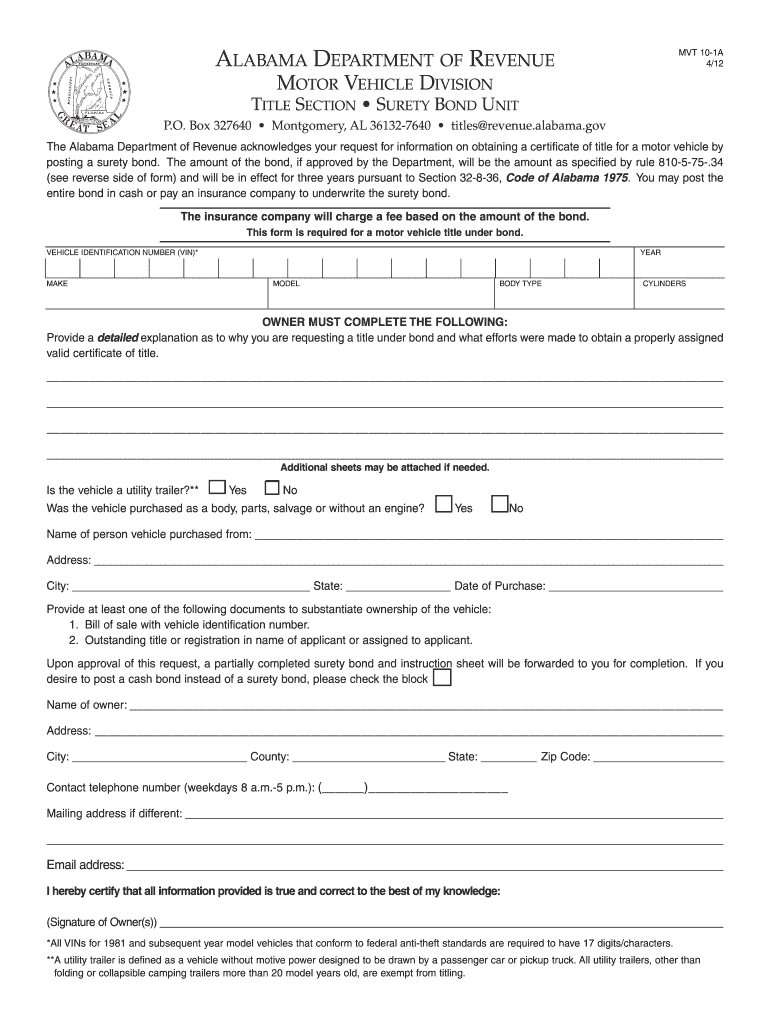
Ent of Revenue acknowledges your request for information on obtaining a certificate of title for a motor vehicle by posting a surety bond. The amount of the bond, if approved by the Department, will be the amount as specified by rule 810-5-75-.34 (see reverse side of form) and will be in effect for three years pursuant to Section 32-8-36, Code of Alabama 1975. You may post the entire bond in cash or pay an insurance company to underwrite the surety bond. The insurance company will charge a fee b.
Loading

Open form follow the instructions

Easily sign the form with your finger

Send filled & signed form or save
How to fill out the AL MVT 10-1A online
The AL MVT 10-1A form is essential for individuals seeking to obtain a motor vehicle title under a surety bond in Alabama. This guide provides a step-by-step approach to correctly complete the online version of the form, ensuring all necessary information is accurately submitted.
Follow the steps to effectively complete the AL MVT 10-1A online.
- Press the ‘Get Form’ button to access the AL MVT 10-1A form and open it in your preferred editor.
- Enter the vehicle identification number (VIN) in the designated field. Ensure that the VIN has 17 characters for vehicles manufactured in 1981 or later.
- Fill in the year, make, model, body type, and number of cylinders of the vehicle accurately. These details are crucial for identification.
- In the section for the owner's explanation, provide a clear and honest rationale for requesting a title under bond, along with any efforts made to secure a valid certificate of title.
- Indicate whether the vehicle is a utility trailer by selecting 'Yes' or 'No' in the corresponding section.
- Disclose if the vehicle was purchased as a body, parts, salvage, or without an engine by selecting 'Yes' or 'No'.
- Provide the name and address of the person from whom the vehicle was purchased, ensuring that the details are complete.
- Select the appropriate documents that substantiate ownership of the vehicle from the list provided, such as a bill of sale or an outstanding title.
- Complete the owner's name and address fields accurately, making sure to include the city, county, state, and zip code.
- Enter a daytime contact number for any inquiries, and provide a different mailing address if applicable.
- Include an email address for communication regarding the application process.
- Sign the form to certify that all information provided is true and correct.
- After filling out the form, take the opportunity to review and save any changes you have made. You can then proceed to download, print, or share the completed form as needed.
Complete your AL MVT 10-1A online today to ensure a smooth processing of your motor vehicle title request.
Experience a faster way to fill out and sign forms on the web. Access the most extensive library of templates available.
Related content
Complete an electronic request for an Application for Title Surety Bond (form MVT 10-1A)...
by MCB Gazi · 2005 · Cited by 6 — JUSTIFICATIVA E OBJETIVOS: A osteoartrite é a mais...
Cuando el sistema se encuentra en standby, lámpara. STANDBY se enciende en rojo. •...
Get answers to your most pressing questions about US Legal Forms API.
How to fill out Form MV 1 Georgia?
To fill out Form MV 1 in Georgia, begin by writing key information such as owner details and vehicle description. Make sure to include the previous title information if applicable, along with your signature. After completing the form, submit it along with any required documentation to your local DMV. Experienced users often refer to AL MVT 10-1A for best practices in title applications.
How to fill out a vehicle title application?
Filling out a vehicle title application requires you to have certain information ready. Start by providing your personal details, such as name and address, along with vehicle information like make, model, and VIN. After providing all necessary details, submit the application to your local DMV. Following the AL MVT 10-1A requirements can ensure you complete the application correctly.
How hard is it to get a bonded title in Alabama?
Obtaining a bonded title in Alabama can be straightforward if you follow the required steps. First, you must apply for a title bond as a form of insurance against any claims on the vehicle. Once you secure the bond, you can submit it along with your application for a title to the DMV. Understanding the AL MVT 10-1A can help streamline this process.
How do I transfer ownership of a title in Alabama?
Transferring ownership of a title in Alabama involves several key steps. First, both the seller and buyer must complete the title transfer form on the back of the title. Next, submit the completed title along with necessary forms, such as an Application for a New Title, to your local DMV. Always make sure to comply with AL MVT 10-1A guidelines to avoid any issues during the ownership transfer.
How do I fill out the back of an Alabama car title?
To fill out the back of an Alabama car title, locate the section designated for the seller’s signature and information. Provide the name, address, and signature of the seller, along with the date of sale. Ensure you record the odometer reading accurately. Following these steps helps you smoothly complete the process aligned with AL MVT 10-1A requirements.
Does Alabama require a notary for title transfer?
Alabama does not universally require a notary for title transfers, but specific situations may warrant notarization as detailed in AL MVT 10-1A. If you're unsure about whether you need a notary, check the details on your title and consult with local authorities. Using a platform like uslegalforms can also assist in clarifying your needs.
Can I transfer a car title online in Alabama?
Absolutely, you can transfer a car title online in Alabama following the protocols established in AL MVT 10-1A. The Alabama Department of Revenue provides online services that make this process user-friendly. Be sure to have the necessary vehicle information and proof of ownership available for a smooth transfer.
Can you transfer a title online in Alabama?
Yes, you can transfer a title online in Alabama if you comply with the guidelines set in AL MVT 10-1A. This online process streamlines title transfers, allowing you to complete them conveniently from home. Ensure you have all required information and documents ready for a seamless experience.
Can I sell a car with a bonded title in Alabama?
Yes, you can sell a car with a bonded title in Alabama. The bonded title, as allowed under AL MVT 10-1A, verifies ownership and offers protection for potential buyers. Just make sure to disclose the title status to buyers and provide the necessary documentation during the sale.
Can you transfer a digital title?
Yes, you can transfer a digital title in Alabama. To do so, you must follow the state's regulations outlined in AL MVT 10-1A. This process ensures a secure and efficient transfer of ownership, allowing you to complete transactions online or through certified methods.
Use professional pre-built templates to fill in and sign documents online faster. Get access to thousands of forms.
If you believe that this page should be taken down, please follow our DMCA take down process here.