Get Stream Specialization Withdrawal Form - Com11 - Umac
How it works
-

Open form follow the instructions
-

Easily sign the form with your finger
-

Send filled & signed form or save
How to use or fill out the Stream Specialization Withdrawal Form - COM11 - Umac online
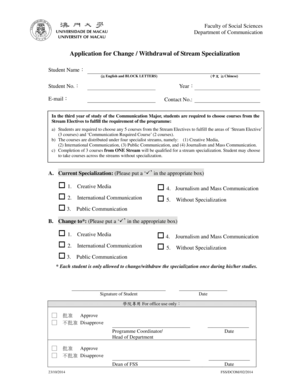
Filling out the Stream Specialization Withdrawal Form - COM11 - Umac online is a straightforward process that allows students to change or withdraw from their chosen specialization. This guide provides detailed, step-by-step instructions to help users navigate the form efficiently.
Follow the steps to complete the form effectively.
- Click ‘Get Form’ button to access the form and open it in the editor.
- Begin by entering your name in English using BLOCK LETTERS in the designated field labeled 'Student Name'.
- Add your name in Chinese characters in the section labeled '(中文 in Chinese)'.
- Fill in your student number in the 'Student No.' field.
- Indicate your year of study in the 'Year' section.
- Provide your email address in the 'E-mail' section.
- Enter your contact number in the 'Contact No.' field.
- In section A, mark the box corresponding to your current specialization by placing a ‘’ in the appropriate box.
- In section B, select your desired specialization change by marking a ‘’ in the appropriate box.
- Sign the form in the designated area labeled 'Signature of Student'.
- Enter the date you are completing the form in the 'Date' section.
- Review your entries for accuracy before finalizing the document. Once satisfied, save your changes, then download, print, or share the completed form as necessary.
Take the first step towards changing your specialization by filling out the Stream Specialization Withdrawal Form online today.
1:24 14:24 Add Fillable Forms to Edit & Get Signed - YouTube YouTube Start of suggested clip End of suggested clip Top. Right feel free to pause the video of course anytime. But if you're still working on navigatingMoreTop. Right feel free to pause the video of course anytime. But if you're still working on navigating to the documents tab of your. Room. We'll then want to click on add on the very top. Right.
Industry-leading security and compliance
-
In businnes since 199725+ years providing professional legal documents.
-
Accredited businessGuarantees that a business meets BBB accreditation standards in the US and Canada.
-
Secured by BraintreeValidated Level 1 PCI DSS compliant payment gateway that accepts most major credit and debit card brands from across the globe.