Loading
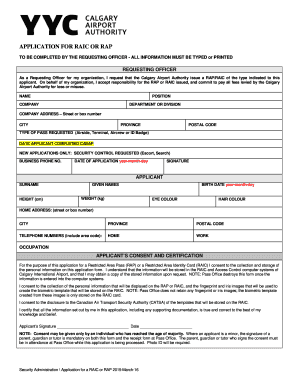
Get Yyc Application For A Raic Or Rap - Calgary International Airport
How it works
-

Open form follow the instructions
-

Easily sign the form with your finger
-

Send filled & signed form or save
How to fill out the YYC Application For A RAIC Or RAP - Calgary International Airport online
Completing the YYC Application For A RAIC Or RAP is essential for individuals requiring access to restricted areas at Calgary International Airport. This guide provides clear, step-by-step instructions to assist users in successfully filling out the application online.
Follow the steps to complete the application effectively.
- Press the ‘Get Form’ button to retrieve the YYC Application For A RAIC Or RAP. This action opens the form for you to fill out.
- In the ‘Requesting Officer’ section, enter your name, position, company, department or division, and full address, including street or box number, city, province, and postal code. Be sure to provide the business phone number, and indicate the type of pass you are requesting, such as Airside, Terminal, Aircrew, or ID Badge.
- Specify the date the applicant completed the CASAP and state the date of application in the specified format (year-month-day). Don't forget to sign this section as the requesting officer.
- In the ‘Applicant’ section, complete the applicant's surname, given names, height in centimeters, weight in kilograms, date of birth in the specified format (year-month-day), eye color, and hair color.
- Provide the home address, including street or box number, city, province, and postal code. Fill out the telephone numbers for both home and work, ensuring to include the area code.
- Indicate the applicant's occupation clearly, ensuring that all required information is accurately recorded.
- Read the ‘Applicant’s Consent and Certification’ carefully. By signing, you agree to the collection and storage of personal information for the purpose of this application and recognize the disclosure requirements. Ensure that you provide the applicant's signature and the date.
- If the applicant is a minor, ensure the signature of a parent, guardian, or tutor is present, along with their attendance at the Pass Office during the application process. Remember to bring a valid photo ID.
- Once all sections of the form are filled out accurately and completely, save any changes made, and choose to download, print, or share the completed application.
Begin the application process online today to secure your access.
The YYC LINK is a custom-built, fully accessible, interior transit system that accommodates people of all abilities. GEC led the design of this complex renovation, which includes stations, wayfinding, branding, and custom compact vehicles.
Industry-leading security and compliance
US Legal Forms protects your data by complying with industry-specific security standards.
-
In businnes since 199725+ years providing professional legal documents.
-
Accredited businessGuarantees that a business meets BBB accreditation standards in the US and Canada.
-
Secured by BraintreeValidated Level 1 PCI DSS compliant payment gateway that accepts most major credit and debit card brands from across the globe.