Loading
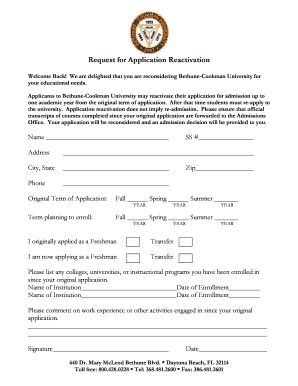
Get Reactivation Form - Bethune-cookman University - Cookman
How it works
-

Open form follow the instructions
-

Easily sign the form with your finger
-

Send filled & signed form or save
How to fill out the Reactivation Form - Bethune-Cookman University - Cookman online
Completing the Reactivation Form for Bethune-Cookman University is a straightforward process. This guide will provide you with clear, step-by-step instructions to help you successfully fill out and submit the form online.
Follow the steps to complete the Reactivation Form with ease.
- To begin, press the ‘Get Form’ button to retrieve the Reactivation Form. This action will open the form in your preferred online editor, allowing you to fill it out digitally.
- Start by entering your name in the designated field at the top of the form. Ensure that your name matches the one used in your original application.
- Provide your Social Security number in the corresponding field. Make sure to enter it accurately to avoid any processing issues.
- Fill in your current address, including city, state, and zip code. This information is important for correspondence regarding your application.
- Indicate your original term of application by selecting the appropriate season: Fall, Spring, or Summer. Then, specify the term you are planning to enroll in.
- Select whether you originally applied as a Freshman or Transfer student, and indicate if you are now applying in the same category or changing your status.
- List any colleges, universities, or instructional programs you have been enrolled in since your original application. Provide the name of the institution along with the date of enrollment for each.
- In the comments section, share details about any work experience or activities you have engaged in since your original application. This information can strengthen your reactivation request.
- Finally, sign and date the form at the bottom. Your signature confirms that the information provided is accurate to the best of your knowledge.
- Once your form is complete, you can save your changes, download, print, or share the form as needed for submission.
Complete your Reactivation Form online today to take the next step in your educational journey!
Related links form
Bethune–Cookman University (BCU or Bethune–Cookman) is a private historically black university in Daytona Beach, Florida. Bethune–Cookman University is affiliated with the United Methodist Church. The primary administration building, White Hall, and the Mary McLeod Bethune Home are two historic locations.
Industry-leading security and compliance
US Legal Forms protects your data by complying with industry-specific security standards.
-
In businnes since 199725+ years providing professional legal documents.
-
Accredited businessGuarantees that a business meets BBB accreditation standards in the US and Canada.
-
Secured by BraintreeValidated Level 1 PCI DSS compliant payment gateway that accepts most major credit and debit card brands from across the globe.