Loading
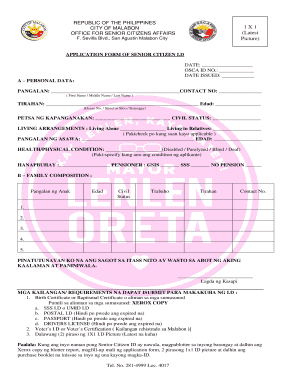
Get 1 X 1 (latest Picture) - Malabon City
How it works
-

Open form follow the instructions
-

Easily sign the form with your finger
-

Send filled & signed form or save
How to fill out the 1 X 1 (Latest Picture) - Malabon City online
Filling out the 1 X 1 (Latest Picture) - Malabon City application form online can streamline the process of obtaining your senior citizen ID. This guide provides step-by-step instructions to ensure that you can successfully complete the form.
Follow the steps to fill out the form accurately and efficiently.
- Click the ‘Get Form’ button to obtain the application form and open it in your preferred editor.
- Begin by filling in the date on the top of the form. This should be the current date when you are completing the application.
- In section A (Personal Data), provide your full name including your first name, middle name, and last name in the designated fields.
- If applicable, input your spouse's name and age.
- Indicate your current employment status and specify if you are a pensioner and the source of your pension (GSIS, SSS, or none).
- In section B (Family Composition), list the names, ages, civil statuses, occupations, addresses, and contact numbers of your children.
- At the bottom of the form, affirm your statements by signing where indicated.
- Ensure you gather all necessary requirements, which include copies of identity documents and two latest 1 X 1 ID pictures. Review the requirements to avoid delays.
Start the process to obtain your senior citizen ID by filling out the necessary documents online today.